Walk-Through: Simplify API Call Set-Up With a cURL Command

Learn how to connect OpenAI’s chat completion model to Bubble’s API Connector with the click of a button.

Abhinav Narain
March 19, 2024 • A quick read
Walk-Through: Simplify API Call Set-Up With a cURL Command

Bubble’s API Connector plugin is an essential tool for setting up outgoing RESTful API connections with external apps. In other words, this means you can hook up your Bubble app to external data sources or trigger certain actions based on events.

But sometimes, manually setting up your API connections and calls can be clunky and time-consuming. Good news: Many services provide a call response in cURL format in their documentation that you can copy and paste as a shortcut. In this walk-through, we’ll show you what those look like so you can be on the lookout for it next time you use the API connector. This example demonstrates how to use a cURL command to connect your API Connector with OpenAI and begin building AI into your app.

Follow along with these step-by-step instructions:

  1. Install the API Connector plugin to your Bubble project.
  2. Head to OpenAI’s developer reference on chat completion. You’ll need an OpenAI account and an authorization token for this exercise.
  3. Look in the upper-right of the demo editor to copy the example call response in cURL.
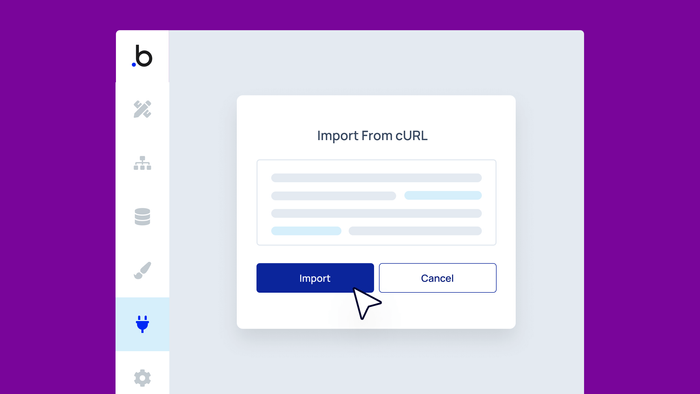
  4. Switch back to your Bubble API Connector tab and click on Import another call from cURL.
  5. Paste your example call and click Import.
  6. Ta-da — you now have the framework for a customizable OpenAI API call!
Start building for free

Build for as long as you want on the Free plan. Only upgrade when you're ready to launch.

Join Bubble


LATEST STORIES

blog-thumbnail

9 Best Replit Alternatives in 2026

Explore nine Replit alternatives ranging from AI coding assistants to visual development platforms. We compare features, pricing, and ideal use cases to help you find the right tool for your project.

Bubble
February 10, 2026 • 8 minute read
blog-thumbnail

7 Best Lovable Alternatives for AI App and Web Development

Discover seven Lovable alternatives for AI app development, from platforms with full visual control to specialized coding tools. We break down features, pricing, and ideal use cases to help you choose the right platform.

Bubble
February 09, 2026 • 8 minute read
blog-thumbnail

Bolt vs. Cursor vs. Bubble: A 2026 Comparison of Top AI Builders

Which AI app builder is right for you? See how Cursor, Bolt, and Bubble approach app development, design, AI support, coding, and more to find the right one for your skill level and project needs.

Bubble
February 09, 2026 • 16 minute read
blog-thumbnail

Replit vs. Cursor vs. Bubble: 2026 Comparison of the Top AI App Builders

Which tool is right for you? See how Cursor, Replit, and Bubble compare in terms of building an app, app design, security, integration, technical skill needed, and more.

Bubble
February 06, 2026 • 21 minute read

See How We Redesigned the Property Editor for Better Building

December 11, 2025 • 4 minute read

The Easiest Way to Build a Custom CRM (With AI, Updated for 2025)

October 10, 2025 • 17 minute read

What Can You Build on Bubble? 25 Examples to Inspire You

November 18, 2024 • 19 minute read

The Future of Bubble’s Editor: Introducing the New Workflow Tab

October 11, 2024 • 3 minute read

Efficient App Building 101: Improving Your Workload Usage

July 01, 2024 • 3 minute read

Build the next big thing with Bubble

Start building for free
CoAlias Logo Powered by CoAlias