TL;DR: AI app builders like Lovable and Bolt generate code that often leaves non-developers stuck, requiring traditional coding skills to finish and launch. Bubble offers a different approach as the only fully visual AI app builder, allowing users to switch between AI generation and drag-and-drop editing to build production-ready web and mobile apps without ever touching code.
AI app builders let you describe what you want and watch an app take shape — no coding required (at least in theory). But with new ones popping up seemingly every week, it can be hard to know which will best suit your needs.
In this comparison, we tested three platforms with fundamentally different approaches: Lovable and Bolt generate code through AI, while Bubble combines AI with visual editing for full control.
We'll explain the fundamental difference between generating code and visual apps, how that affects everything from customization to launch, and which approach fits your goals — whether you want a prototype or a real business.
What is AI app building?
AI app building lets you create software by describing what you want in plain language. Instead of learning programming languages or hiring developers, you tell an AI what your app should do, and it generates the structure, design, and functionality for you.
This approach — typically called "vibe coding" — has made app creation accessible to millions of people who never thought they could build software. You can go from idea to working prototype in minutes rather than months.
But there's a catch — and it's a big one. When AI hits its limits, you're left with code you can't read or endless prompt loops.
The platforms in this comparison each solve this problem differently, which is why choosing the right one matters so much for your project's success.
How AI app building works
Most AI app builders follow a sequential process:
- You explain what you want to build in natural language, including features, design preferences, and functionality
- The platform creates your app's structure, user interface, and basic logic
- Iterate and refine — Continue building with AI, visual editing, or both
- You publish your app for users to access
The critical difference is how platforms let you work beyond initial generation:
- Some platforms require you to edit code manually
- Others trap you going back and forth with AI without getting results you need
- Platforms like Bubble give you visual tools to take control without having to read or touch code
Lovable vs. Bolt vs. Bubble: Key factors
Before diving into specific features, here's a quick overview of each platform:
Lovable is an AI app-building platform founded in 2023 that allows users to build and iterate on an app idea by interacting with a chat-based AI model. It targets the "99% of people who can't code" by generating standard React, Supabase, and Tailwind code. It stands out for its strong frontend design and "vibe coding" speed.
Bolt is an AI-powered platform created by StackBlitz that integrates AI building with a browser-based development environment. It brands itself — and works well — as an AI assistant for developers looking to speed up familiar tasks using WebContainers technology. It's designed to help technical users generate new code quickly, rather than starting from a “blank page.”
Bubble is the only fully visual AI app builder that lets you vibe code without the code to launch real apps to real users — for both web and native mobile. Switch between AI and visual editing as needed. This way, anyone can build, launch, and grow a real business while remaining in control the whole time.
For deeper dives into individual platform comparisons, check out:
As we compare these platforms, we’re focusing not only on the initial output of the AI-generated code or app, but also how well these platforms help builders deal with iteration, customization, security, and scaling.
These are especially big concerns for users without technical expertise. Technical users may be able to hop in and edit code manually when the AI gets stuck, but non-coders may find themselves stuck in “prompt loops” — endlessly prompting the AI but not getting the results they want.
Each of these platforms resolves that problem differently.
- Bolt requires traditional coding to take your app over the finish line. AI iterations are often blocked by rate limits or inconsistent outputs.
- Bubble provides a drag-and-drop editor that ensures no-code stays codeless. You can make changes yourself in a way you understand, while still getting full control and customization as you build, launch, and scale a fully functional app.
- Lovable takes a middle-of-the-road approach, offering AI chat, manual coding, or limited visual editor options.
Here’s how the three stack up on other core features:
| Factor | Lovable | Bolt | Bubble |
|---|---|---|---|
| Initial output quality | ⭐⭐⭐⭐ | ⭐⭐⭐ | ⭐⭐⭐⭐ |
| Design capabilities |
⭐⭐⭐💫 Responsive design and AI-powered iterative editing, but limited visual editing capabilities. |
⭐⭐⭐ No drag-and-drop editor. Fast design iteration and quality via AI chatbot are both strengths. |
⭐⭐⭐⭐ AI Agent for generating and editing elements, plus drag-and-drop visual editor for pixel-perfect control. Responsive design by default. |
| Native mobile app development |
⭐ None. Lovable focuses exclusively on web application development and requires a wrapper to approximate the native experience. |
⭐⭐⭐ Supports mobile app development via Bolt + Expo integration, allows use of the AI chat for development. |
⭐⭐⭐⭐ Native mobile app builder with visual editor, deploy directly to App Store and Google Play. |
| Collaboration |
⭐⭐⭐ Supports real-time collaboration with unlimited collaborators on all plans, including free. |
⭐⭐⭐ Team plans with real-time editing capabilities. |
⭐⭐⭐⭐⭐ Real-time collaboration with adjustable permissions for each user. |
| Backend and database support |
⭐⭐⭐ Lovable Cloud provides native backend with authentication and user management, or Supabase integration available. |
⭐⭐⭐⭐⭐ Built-in Bolt database included by default (works out of the box with no setup required). Also supports external database options via Supabase and Firebase integrations. |
⭐⭐⭐⭐⭐ Native backend and database that doesn't require technical expertise or extra costs to set up. |
| Security and compliance |
⭐⭐⭐⭐ SOC 2 Type 2 compliant, ISO 27001:2022 certified, and GDPR compliant. Provides AI-powered security scanning. |
⭐⭐ Bolt.new doesn't offer built-in app-level security features, but works with platforms like Supabase and Firebase that provide security capabilities. |
⭐⭐⭐⭐ Bubble offers enterprise-grade security features, including SOC-II and GDPR compliance, advanced encryption and monitoring, and custom privacy rules. |
| Deployment/hosting |
⭐⭐⭐⭐ One-click deployment with native Lovable Cloud hosting included. |
⭐⭐⭐⭐⭐ One-click deployment with native Bolt hosting included (free .bolt.host domain). |
⭐⭐⭐⭐⭐ One-click deployment and native hosting. |
| Technical expertise |
⭐⭐⭐⭐ Less technical than many AI builders, but technical background is still very helpful for iteration and launch. |
⭐⭐⭐ Best for those with moderate technical expertise. |
⭐⭐⭐⭐⭐ Best-in-class for developers and non-developers alike. |
App output quality
The initial quality of your app output determines how much work you'll need to do to get your app ready for launch. The better the starting point, the less time you spend fixing and refining.
All three builders produced strong initial outputs, with important differences:
- Lovable’s output had the most consistently strong UI and clean aesthetics, but lacked backend functionality
- Bolt’s output was more complete and quite good across both frontend and backend expectations — when it worked — but we hit rate limits quickly
- Bubble had the most consistent output with complete functionality and workflows thanks to the built-in database
Lovable is the most design-focused platform, delivering polished layouts with minimal prompting. It generates standard React, Supabase, and Tailwind code, which is great if you plan to export and hand off to a developer later.
However, Lovable struggled with features and functionality. While Lovable Cloud provides a native backend with authentication and user management (built on top of Supabase), Lovable's AI often struggled to interpret and accurately build the features we needed. User reviews on G2 highlight a common "looping" problem where the AI fixes one bug but introduces another, consuming credits without resolving the issue. Complex logic often required manual coding to fix.
As a result, we liked Lovable best for creating MVPs, mockups, and prototypes, where design matters a lot more than functionality.
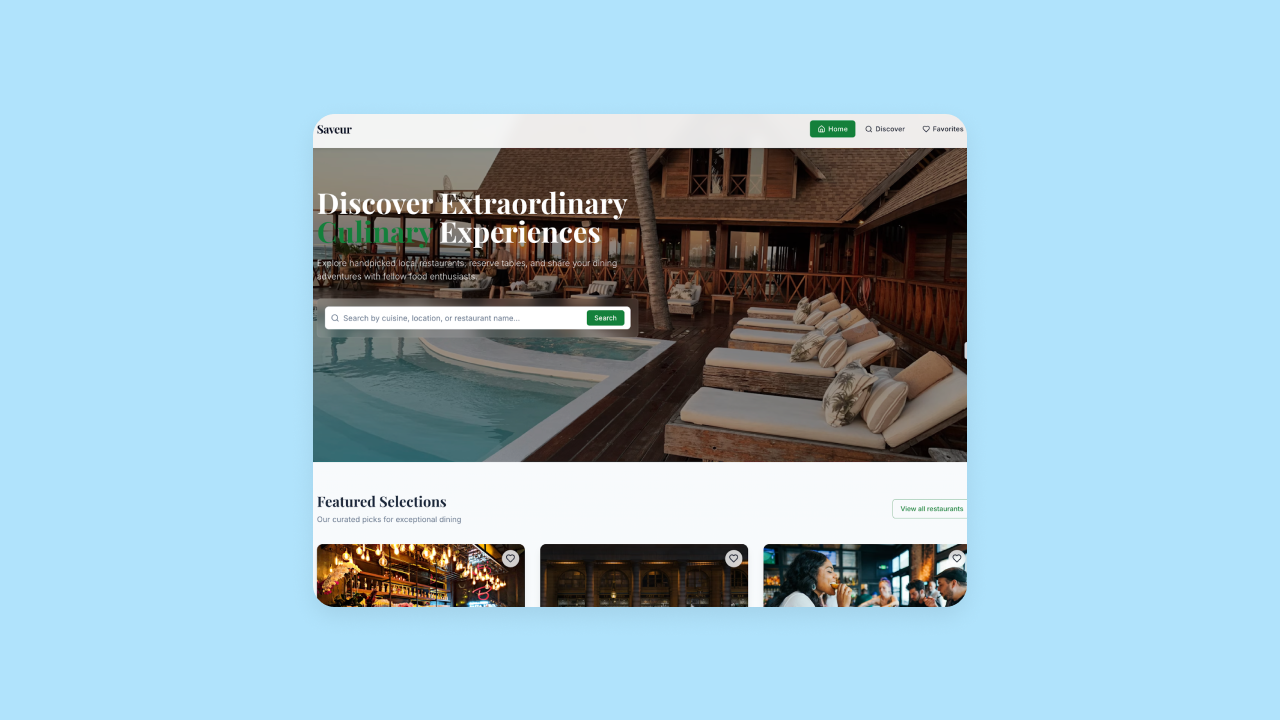
Bolt, by contrast, generated both great UI and good features from the initial output. One of our testers found the design iteration great as well, saying it only took one prompt to entirely change the look and feel of the app (with Lovable, design iteration via the AI chat had more mixed results).
In one of our tests, Bolt generated a fairly complete app, including more features than we asked for, robust and working functionality, and great sample data that made the app look and feel production-ready from the initial output. However, in other tests, features and functionality were pretty limited.
And in one test, Bolt didn’t even finish generating an initial output of our app before we were blocked by the daily rate limit!
Although Bolt's free plan includes roughly 1 million tokens per month, it enforces a daily cap of 300,000 tokens. It wasn't clear how many tokens your prompt(s) use or how quickly you’ll hit those limits. This is a common problem mentioned in the Bolt forums as well, and makes for a frustrating experience.

Bolt now offers a built-in Bolt database that works out of the box with no setup required, though you can also use Supabase or Firebase for databases. Our non-developer testers found Bolt's native database option much simpler than the previous third-party-only approach.
Bubble AI generates apps with solid UI and complete functionality from the start. However, unlike Bolt and Lovable, Bubble has a built-in backend with automatic privacy rules, so functionality just worked. And with the AI Agent, you can continue iterating and troubleshooting with AI throughout your entire build—not just at the initial generation. Bubble’s functionality was also more consistent than Bolt’s — solid on every try, rather than great sometimes and incomplete other times.
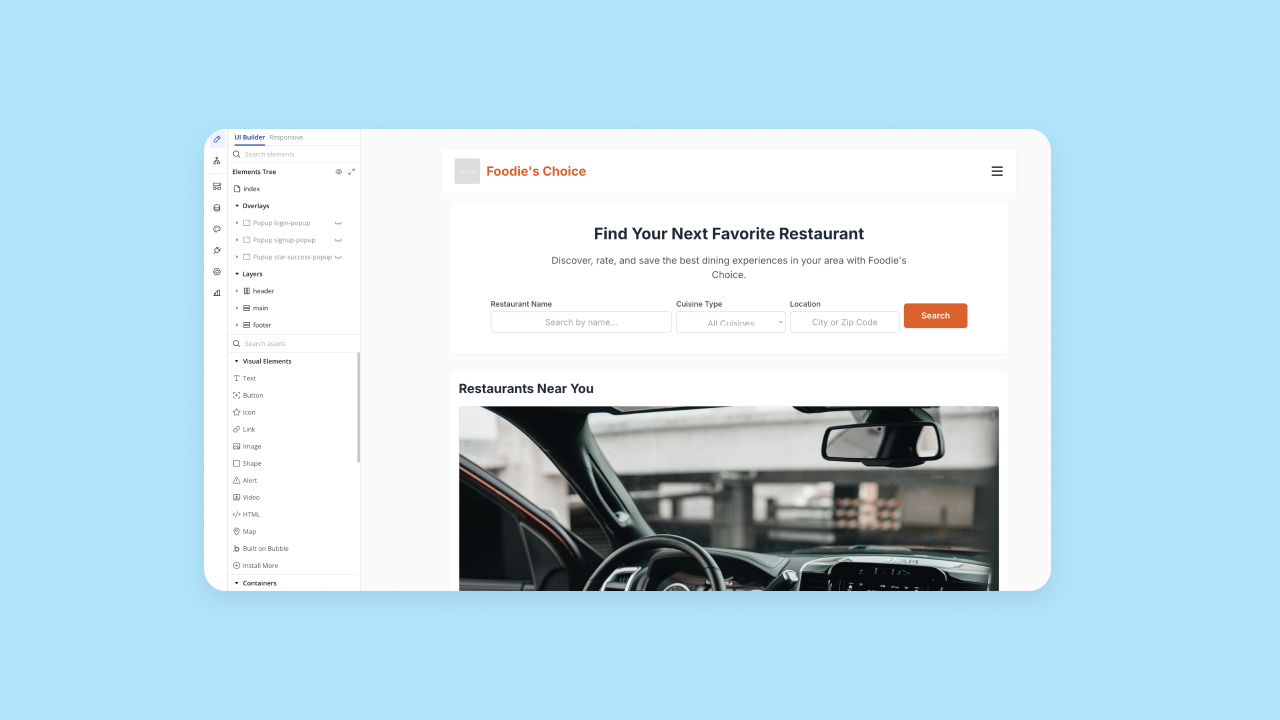
As such, we liked Bubble best for creating production-grade apps, especially for users who aren’t confident coding. Bubble gets you started in every aspect your app needs, and you can set up databases, logic, and functionality all within the Bubble platform by chatting with the AI Agent or using the visual editor.
App development workflow
Good initial output matters, but what really determines success is how you work throughout the entire process — from first generation to launch and beyond.
Bolt and Lovable have similar processes, but Bolt is more code-first for developers while Lovable is more visual for beginners.
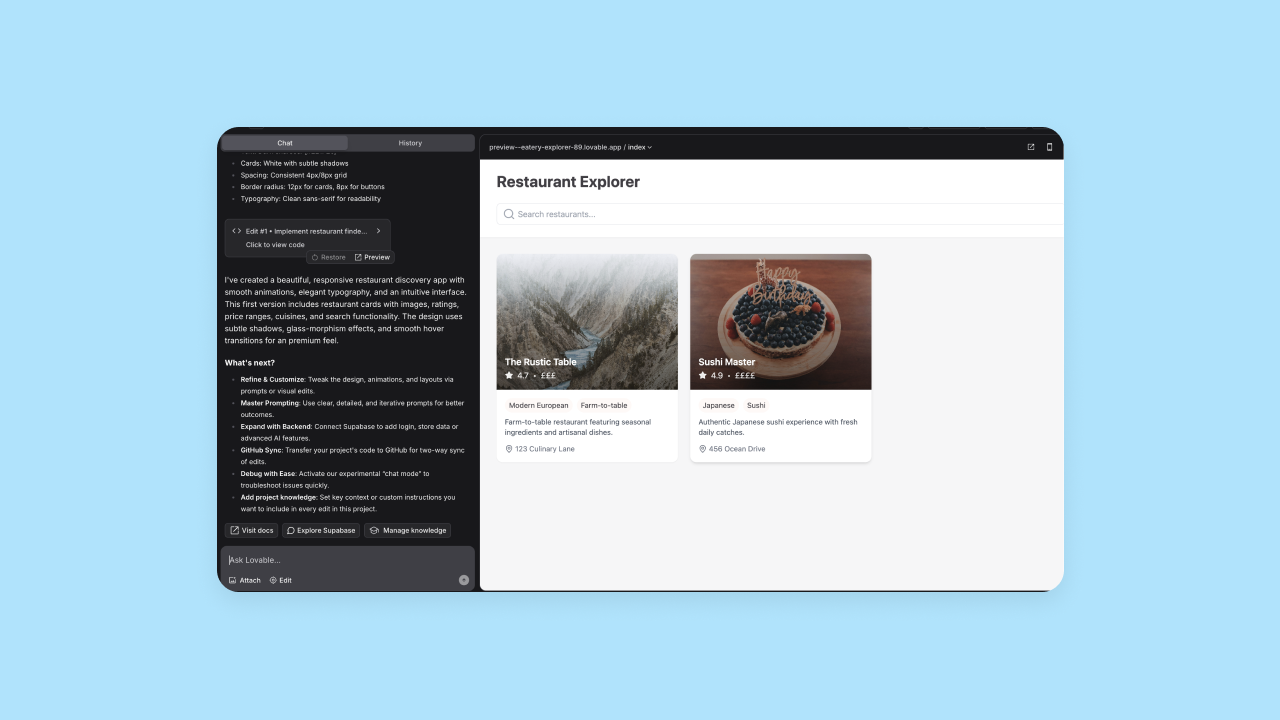
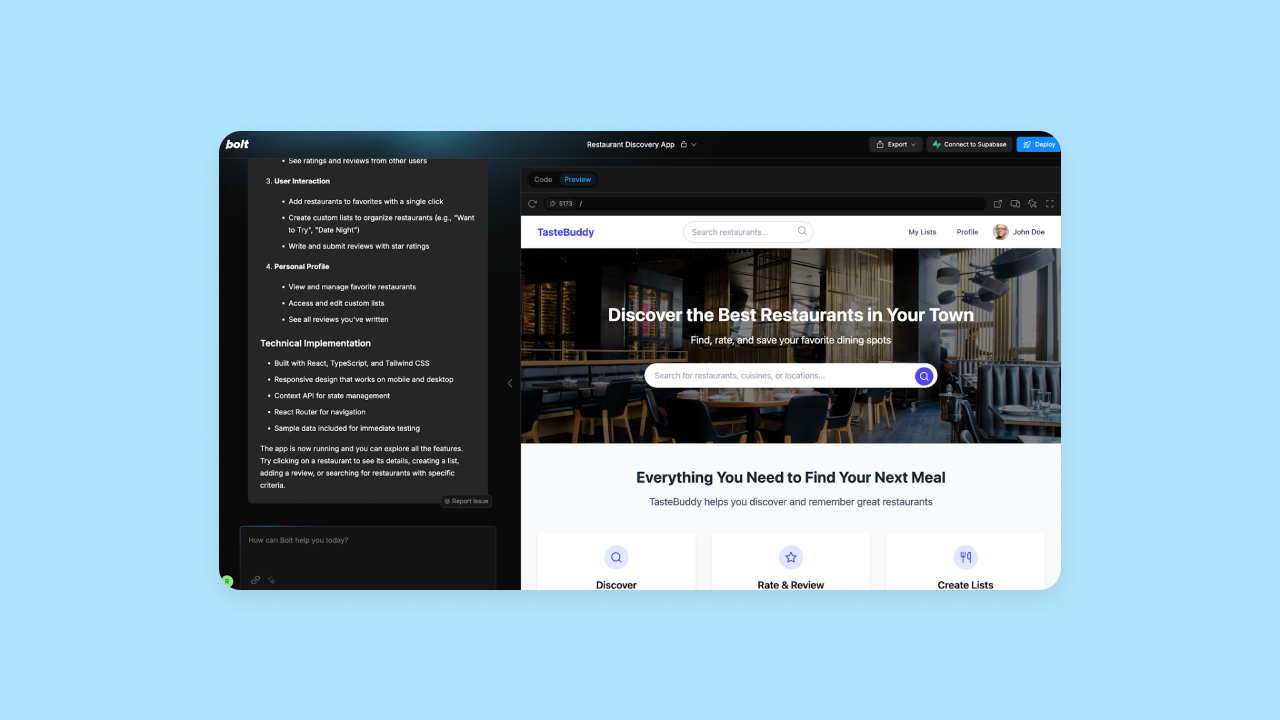
Bolt defaults to the code view, and allows you to edit code directly from this editor. It uses StackBlitz WebContainers to create a full Node-like environment right in your browser. On Lovable, the default is the visual preview. You can view the code, and with Dev Mode you can edit code files directly in Lovable (available for all paid users as an experimental Labs feature), or you can export to GitHub for version control.
Lovable also offers two distinct modes: Chat mode for planning and debugging, and Agent mode, an autonomous agent that can read and modify code, inspect logs, and query databases. While powerful, Agent mode consumes credits quickly and can sometimes get stuck in loops.
Bubble takes a slightly different approach—first generating a “project blueprint” and main features for you to approve. This helps ensure the initial AI output is more complete and closer to what you’re anticipating, rather than having to go back and forth with prompting iterations after the initial output is generated, as with Bolt and Lovable.
Then, Bubble AI works in the background before unveiling your app in the visual editor. Bubble’s visual editor means you preview and edit in the same place — and the AI Agent is right there to help you build, troubleshoot, and iterate throughout. Bubble's workflow will feel more familiar to users of visual editors like Webflow or Squarespace.
Here’s how the three stack up more specifically:
| Feature | Lovable | Bolt | Bubble |
|---|---|---|---|
| Generates a project plan to review first | ❌ | ❌ | ✅ |
| Provides a visual preview of your app | ✅ | ✅ | ✅ |
| Provides the code for your app | ✅ | ✅ | ❌ |
| Allows you to edit your app visually | Limited to simple UI changes | ❌ | ✅ |
| Allows you to edit the code of your app directly | ✅ Directly in Lovable via Dev Mode (available for all paid users as an experimental Labs feature), or via GitHub export | ✅ Directly in the development environment | ✅ Custom code is optional for advanced use cases — not required |
Lovable shines for non-developers who need only limited customization and want to focus on an app that looks good and can be iterated on via AI. Because developing functionality through Lovable’s AI chat can be buggy and inconsistent, Lovable works best for developing mockups where functionality isn’t as much of a concern. If and when you’re ready to develop your app further, you can export the code to send to your dev team (if you have one).
Bolt is better for developers and programmers who are looking for an AI-assisted programming environment. Bolt’s code-first approach and limited daily token rates for AI usage mean that technical experience and manual coding is a must to move quickly on development.
Bubble takes the cake for those looking for a true no-code experience combined with the speed of AI. Bubble’s visual editor eliminates AI prompt loops or the need for manual coding (though it allows custom code as an option for experienced developers) while being sophisticated enough to develop fully functional, production-grade apps that are ready for launching and scaling a business.
Customizability
AI is an amazing accelerator, but it can’t read your mind (yet). You’ll always need some level of customization to build exactly what you’re looking for.
Bolt and Bubble both offer extensive customization for design and functionality.
On Bolt, you can customize by prompting the AI chat (simple but inconsistent output), or you can manually edit the code (full control, but requires technical expertise). Bolt allows you to select specific AI models for different tasks, such as Claude 3.5 Sonnet for everyday building or Opus for complex reasoning. However, Bolt's AI token limits also prevented us from making many changes to our app via the AI, so traditional coding knowledge is a must if you’re looking to make lots of customizations (or you can upgrade to higher tiers for higher token limits).
On Bubble, you get both AI-assisted and direct visual editing for customizations. Customization is one of Bubble’s core strengths, and it supports the same level of customization as custom code, but you see exactly what you're building in visual workflows and natural language. You get full control over UI design, workflows, triggers, database structures, logic, and more — all without having to code.
Bubble lets you debug and iterate on your app visually, too. Bubble’s “issue checker” automatically finds potential errors in your app, such as missing data or incomplete actions, and tells you exactly what they are, so you can fix them through the drag-and-drop editor. This is much easier compared to using traditional code or going back-and-forth with AI prompting, as you’d have to do on Lovable and Bolt.
Lovable offers the both options for making customizations — but neither of them work particularly well. Lovable's main customization method is re-prompting the AI, which often becomes frustrating when the AI doesn't understand your request. To help with this, Lovable introduced "Custom Knowledge," allowing you to upload project goals, personas, and guidelines to give the AI better context. Sometimes Lovable's AI interpreted our prompts well, while other times we got stuck in prompt loops going back and forth with the AI chat without being able to get our app to look or function exactly how we wanted it to.
Like Bolt, Lovable also allows you to view the code and edit it directly via Dev Mode on paid plans, or transfer it to GitHub for manual edits. Lovable also offers some visual editing, but it’s limited to pretty simple changes, like changing the font, color, or copy — it’s not a full visual editor like Bubble’s.
Design functionality
Evaluating the level of design functionality a tool has can help you decide how easy it will be to create visually appealing apps with that tool — are there a lot of design tools and features within the platform, or does a good design mostly stem from traditional coding?
Lovable produces strong AI-generated designs with automatic responsive layouts. However, Lovable doesn’t offer a strong visual builder for designing — you can only make very basic design changes visually, like changing fonts and colors. All other design changes have to be changed manually (via code) or iteratively via the AI chat.
Bolt's AI-generated design quality can be great, but it lacks a visual editor. Compared to Lovable, Bolt’s design-focused AI iterations worked well most of the time: One or two prompts were generally enough to change the entire look and feel of the app, whereas Lovable needed more specific prompting in our tests.
The downside is that without a visual editor, if the AI gets stuck (which it does often), or you max out your rate limits (which happens quickly), you’re blocked from making further changes unless you can edit the code yourself manually.
Bubble combines AI generation with visual editing tools for complete design control. Bubble also gives builders the options of creating reusable design and UI components, custom styles, and a complete design system that allows you to speed up the design process while still building a cohesive app.
Collaboration
The most important factors to consider here will vary based on your needs, but in general, you want to consider if the platform supports multi-user projects, team plans / collaborators, real-time collaboration, and user-specific access permissions.
Here’s how these three stack up on collaboration:
| Feature | Lovable | Bolt | Bubble |
|---|---|---|---|
| Unlimited collaborators on each app | ✅ (Available on all plans including free) | ✅ | ✅ |
| Choose which apps collaborators can access | ✅ (Can invite collaborators to specific projects or entire workspace) | ✅ | ✅ |
| Set access permissions for each users | ❌ | ⚠️ (Project permissions and admin roles available on paid plans; free plans do not have admin roles) | ✅ (Teams plans offer role-based permissions with custom roles for developers, designers, and managers, plus admin controls for view, edit, and manage access levels) |
| Collaborate in real-time | ✅ | ✅ (Available on Teams plans with real-time editing capabilities) | ✅ |
Lovable now supports real-time collaboration with unlimited collaborators on all plans, including free. You can invite team members to specific projects or entire workspaces and see changes as they happen. However, project permissions and admin roles are only available on paid plans.
Bubble and Bolt both offer team collaboration, but Bubble provides more sophisticated features.
For example, on Bubble’s team plans, you can get premium version control within the platform compared to Bolt, where you have to import and export from GitHub repositories. Bubble also has more sophisticated access permissions, allowing you to grant users permissions to edit and view certain areas of your app (i.e., just the frontend, including the database and logs or not, etc.).
Bolt now offers role-based permissions on Teams plans with custom roles for developers, designers, and managers, plus admin controls for view, edit, and manage access levels. Bolt also gives you the option of adding free team members to collaborate on public projects.
Security
Whether you're building your first app or enterprise software, security matters from day one.
Without enterprise-grade security, users won't trust your app with their data, limiting your ability to grow a business.
When considering what security is — or should be — offered by your AI builder, look at:
- The platform-level security offered (the security of the platform you’re building on)
- The app-level security is offered (the security of the app you’re building for your data and end-user data).
- How much security is “built-in” versus what you’ll be expected to implement yourself
Lovable has significantly improved its security posture. It is now SOC 2 Type 2 compliant, ISO 27001:2022 certified, and GDPR compliant. They provide AI-powered security scanning with 20+ platform-specific policies and automated security reviews before deployment. However, builders remain responsible for implementing app-level privacy rules and security configurations.
Bolt's security documentation is more limited. It doesn't offer built-in app-level security features, but works with platforms like Supabase and Firebase that provide security capabilities. They don’t provide support for app-level security, and there aren’t any security features built into the platform itself. While Bolt's checkout product is known for fraud protection, the app builder relies heavily on third-party integrations for security.
Lovable offers native user authentication through Lovable Cloud, which can generate signup/login pages supporting email, phone, and Google sign-in. Alternatively, when using Supabase as the backend, you'll need to configure authentication through Supabase and connect it to your UI.
Having to manage security settings across multiple platforms manually requires a lot more technical expertise and ultimately places the burden of responsibility on the builder for knowing what is required and how to set it up.
Bubble takes a more accessible approach, offering enterprise-grade security features “out-of-the-box” at both the platform level and app-level. For example, Bubble has enterprise-standard security compliances, like SOC 2 Type II and GDPR—basically, certifications that mean Bubble’s platform itself is a secure place to launch and grow an app for business use.
App-level security isn’t automatically built into your app, but Bubble does provide lots of handholds to help guide non-developers through the process. And since you can set up app-level privacy rules via the drag-and-drop editor, it makes creating a secure app simple — you don’t need to code or connect any other services.
Even better, Bubble's security dashboard gives you automated error tracking, security vulnerabilities, and custom alerts to make your app as secure as possible — even if you’re not a cybersecurity expert.
Native mobile app creation
The ability to build — and deploy — native mobile apps is currently a huge differentiator for certain AI app-building platforms.
Currently, Lovable focuses exclusively on web applications, while Bolt and Bubble both support React Native mobile apps. Bolt and Bubble’s approaches to mobile app development mirror their approach to web app development.
Bolt uses Expo (a React Native framework, available as a starter template in Bolt) to allow builders to create native mobile apps for iOS or Android. Once you load the Expo template into Bolt, you can use Bolt’s AI chat and visual preview (as well as the Expo Go app) to create UI, features and functionality for mobile. The AI did well in our tests at creating the expected native mobile functionality.
Bubble also offers native mobile app functionality (beta). Generate mobile apps with AI just like web apps, then customize everything in the visual editor. Build for both web and mobile from the same platform with the same tools. Plus, for those who have already built their web app on Bubble, it’s an easy transition to move your project to the mobile app editor. They can even share a backend, keeping all your data in one place and eliminating re-building databases and logic that’s already been designed.
Once you’re ready to launch, you can publish your app directly to the Apple App Store and Google Play Store right from the Bubble editor.
Integrations
Plugins and integrations can create an ecosystem of support that can expand the possibilities and capabilities of the platform you're using — and the app you create. The key factors to consider with integrations on any AI app-building platform are:
- How robust their integrations library is
- How easy the integrations are to use
- Who “owns” the maintenance and updates for integrations
Lovable and Bolt both offer limited integration libraries. The official integrations they have are pretty easy to use, but outside of that list, you’ll have to code your own (or have the AI help you), which can be pretty tricky. Not to mention that you’re on the hook for maintenance, updates, and bugs when you code your own.
For Lovable, the main integrations include Lovable Cloud (native backend with authentication and user management), Supabase (to manage your app databases) and Github (for custom code iterations and version control). They also integrate with Stripe, OpenAI, Builder.io, and ElevenLabs, alongside a few others. They also offer "personal connectors" via MCP for tools like Notion and Linear.
For Bolt, you'll have the options of built-in Bolt database, Supabase and Firebase for databases, native Bolt hosting or Netlify for deployment, and beyond that, GitHub, GrokAI, Gemini, and ElevenLabs API. Bolt also features "Pica," which allows natural language connectivity to over 170 SaaS APIs.
Bubble, by contrast, offers the largest integration library by far, with thousands of expert-built plugins and integrations including:
- OpenAI and Chat-GPT 4
- Anthropic Claude AI
- DALL-E
- Github
- Figma
- Stripe
- Paypal
- Google Suite products
- and thousands more
Bubble’s plugins are built and maintained by expert developers and integrate seamlessly with the platform. If you want, you can also build your own integrations via Bubble’s API connector, allowing you to easily connect your app on Bubble to basically any other external app or system.
Deployment and hosting
Lovable, Bolt, and Bubble all offer fairly straightforward processes here. All three now offer one-click deployment with native hosting options.
On Lovable, you can deploy with one-click using native Lovable Cloud hosting, which includes custom domain support, SEO optimization, and security scanning. Alternatively, you can export your code to GitHub and host on third-party providers like Netlify or Vercel if preferred.
Bolt now includes built-in hosting and custom domain management. Bolt hosting lets you publish your project to a live URL in seconds, with a free .bolt.host domain included. No third-party account is required — Bolt handles everything. All new projects created in Bolt are published using Bolt hosting by default (powered by Netlify under the hood). You can also export code for self-hosting or use Netlify as an alternative.
Bubble is the super streamlined as well. Since Bubble offers built-in hosting through dedicated, enterprise-grade servers, deployment and hosting is truly “one-click.” All-in-one hosting also makes iterations faster, since everything is in one place. Plus, you have fewer platforms and accounts to juggle — and pay for.
Required technical expertise
While starting an app with AI is simple, taking it over the finish line varies significantly by platform. Depending on your platform, you may need more or less technical expertise to truly take your app to launch and beyond.
All three of these apps require different levels of expertise: Lovable starts out the easiest but then requires more technical knowledge for the final 20%, Bolt requires the most technical expertise all the way through, and Bubble is the most approachable, especially for the final 20%.
Lovable is designed for beginners with an intuitive interface that requires minimal technical expertise to start. It targets the "99% of people who can't code" and excels at getting you to a prototype quickly.
The downside, however, is that you get less control with Lovable in the long run. AI prompting can help you build out your app, but it’s easy to get stuck in prompt loops or not be able to do exactly what you want. If and when you reach that point, your only option is to use traditional coding.
Bolt, by contrast, isn’t trying to target non-developers. You certainly don’t need technical experience to get started with Bolt, but you’ll run into learning curve issues pretty quickly—for example, when trying to set up databases or adding complex functionality to your app. The Bolt team even recommends that non-developers learn coding basics before using Bolt, so technical expertise is a must if you’re looking to build and scale a fully functional app.
Bubble is designed for both developers and non-developers. The visual programming Bubble uses takes some time to learn upfront, but then gives anyone complete control and customization without having to learn code. It’s a platform that “speaks your language,” by working within an immediately visual output, rather than making you learn a programming language to really understand what’s going on. This makes the platform way more approachable in the long-run.
With Lovable and Bolt, you will have to code eventually if you want your app to look and function exactly how you imagined. With Bubble, you can stay codeless through launch and beyond, without sacrificing control or complexity.
Which AI builder is right for you?
Lovable caters to beginners with an intuitive builder focused on AI chat iterations. It works best for builders looking to quickly spin up MVPs, semi-functional prototypes, or simple apps for personal use. Creating something quick and simple with the platform is pretty easy, but developing more complex functionality requires more expertise.
By contrast, Bolt caters to experienced developers and offers a code-first development environment with integrated AI chat and iterations. As a result, it’s better for builders with technical experience who are looking to speed up traditional workflows with the help of AI. It’s great for spinning up new app foundations quickly and having an AI-assisted environment to make iterations alongside traditional coding.
Bubble is the best choice for people who can't code but want to launch serious businesses because it lets you chat with AI when you want speed and edit directly when you want control — switch seamlessly based on what you need. See exactly how your app works, fix issues yourself, and scale to millions of users with built-in infrastructure.
Bubble helps you create an app you understand, not just code you don’t.
The best AI app builder for your needs
If you're building a quick mockup or prototype where design matters more than functionality, Lovable can get you there fast. If you're a developer looking for AI assistance within a traditional coding workflow, Bolt offers that environment.
If you're building a real business, Bubble keeps you fully in the driver's seat with AI or visual tools — you see exactly how your app works and never get stuck with code.
The best way to see if Bubble fits your project is to try it yourself. Get started for free and see how quickly you can go from idea to functional app — without hitting the walls that stop most AI-generated projects at 80%.
Frequently asked questions about AI app builders
Can I switch from another AI app builder to Bubble?
Yes. Since Bubble uses visual programming, you'll recreate your app visually rather than importing code. Many builders find this helps them understand and build more intentionally.
What happens when AI can't build what I need?
Platforms handle this differently. Lovable and Bolt require continued prompting or manual coding. Bubble lets you switch to visual editing or keep using the AI Agent — you have options and are never stuck.
Are AI-built apps secure enough for real users?
It depends on the platform. Lovable is now SOC 2 Type 2 compliant and ISO 27001:2022 certified. Bolt relies on third-party services for security. Bubble offers enterprise-grade security built-in with SOC 2 Type II and GDPR compliance.
How much do AI app builders cost?
All three offer free tiers. Lovable uses a workspace credit model with unlimited users, starting at $25/month for Pro. Bolt uses a token-based model, with a free tier of ~1 million tokens/month (capped daily) and Pro plans starting at $25/month. Bubble includes hosting and databases in its pricing.
Can I build mobile apps with AI app builders?
Lovable doesn't support native mobile and focuses exclusively on web applications. Bolt supports mobile through Expo integration. Bubble offers native mobile development with direct App Store and Google Play deployment.
Build for as long as you want on the Free plan. Only upgrade when you're ready to launch.
Join Bubble