TL;DR: Bubble is best for anyone who wants to build and launch real apps without code — chat with AI when you want speed, edit directly when you want control, and never get stuck with code you can't read. Cursor is best for experienced developers who want an AI co-pilot to speed up their existing coding workflow.
If you've been exploring AI app builders, you've probably encountered endless suggestions for the "best" tool to use. The truth is: the best tool depends on your needs, goals, and technical experience.
This guide compares two fundamentally different tools - Bubble (a visual AI app builder for launching apps without code) and Cursor (an AI coding assistant for developers) — so you can see which fits your next project. We'll cover how AI app builders actually work, what you can build with them, and the key differences between these platforms across features, pricing, and learning curve.
How AI app builders work
AI app builders let you describe what you want to create in plain language, then generate functional applications from those descriptions. The basic workflow: you describe your app idea, the AI generates components (UI, database, logic), and you continue building — either by chatting with AI or editing directly. Where tools diverge is in what they generate and how you can control and iterate on it.
Code-generating AI tools like Cursor produce traditional programming code. The AI writes JavaScript, Python, or other languages that you then need to read, understand, and maintain.
This approach works well if you're already a developer — the AI accelerates your existing workflow. But if you can't read code, you're stuck when something breaks or needs customization.
Visual AI app builders like Bubble take a different approach. Instead of generating code you have to decipher, Bubble creates visual workflows you can see and understand.
The AI app generator produces complete apps for web and native mobile — UI, database with privacy rules, and logic — all represented visually. You can chat with the AI Agent to add features or edit directly in the visual editor for precise control - switch seamlessly between them anytime, without ever touching code.
The key difference isn't just speed — it's what happens when AI hits its limits. With code-generating tools, you're stuck in prompt loops trying to fix bugs you can't see. With visual builders, you can step in and edit directly, because you can see exactly how your app works.
What you can build with AI app builders
AI app builders have moved well beyond simple prototypes. The question isn't whether you can build something functional — it's whether you can build, launch, and scale it without getting stuck.
Common app types built with AI:
- Marketplaces: Two-sided platforms connecting buyers and sellers, with payments, reviews, and messaging
- SaaS products: Subscription-based tools with user accounts, dashboards, and recurring billing
- Internal tools: Custom workflows, admin panels, and data management systems for teams
- Social platforms: Community apps with profiles, feeds, and user-generated content
- Mobile apps: Native iOS and Android applications with push notifications and device features
The difference between platforms shows up when you try to go from prototype to production.
Bubble is the only fully visual AI app builder that lets you vibe code without the code to launch real apps to real users. You can chat with Bubble's AI Agent when you want speed and edit directly in the visual editor when you want control — switch seamlessly between them anytime.
Cursor is an AI-integrated, text-based coding environment built by Anysphere that allows software engineers to code faster and speed up workflows through integrated AI assistance. As a fork of VS Code, it provides a familiar development space to write, edit, and debug code. It relies on the developer’'s knowledge to guide the process, with the AI acting as a highly capable assistant that can write code across multiple files. Used by 64% of the Fortune 500, including companies like Stripe and NVIDIA, it is a powerful tool for professional engineering teams.
Cursor vs. Bubble: Key differences
Bubble and Cursor are both tools that can help you build software faster — but the ways they support builders are completely different. Four core questions can help you decide which tool is right for you:
- Do you want to primarily work with code or use a visual, drag-and-drop interface to design and program your app instead?
- Are you looking for a tool to speed up one of your existing workflows or an all-in-one place to build and launch your app?
- How do you want to use AI as you work?
- What’'s your level of technical expertise — are you an experienced developer or a beginner?
Here’'s how Cursor and Bubble stack up on each of these:
Target audience
Bubble allows anyone to build full-stack apps regardless of programming experience because the AI app generator creates complete, working apps instantly, the AI Agent helps you build workflows, add features, and troubleshoot, and the visual editor lets you understand and control everything without code. Cursor is intended for professional software engineers and large engineering organizations who can read and debug the code it generates.
Non-coders can use Cursor, but will struggle when errors occur. Bubble works visually with AI assistance — you see exactly how your app works in visual workflows and natural language, maintaining control without wrestling with code.
It's not just about code, either. On Cursor, you need to understand all the complexities of how software works, software architecture, programming languages, and so on to effectively prompt the AI and build your app. Bubble's visual editor is much more intuitive for nontechnical users, and doesn't require a programming background to get started.
Can coders use Bubble? Yes, for sure! Building on Bubble makes you faster by combining AI generation with visual editing, without losing any functionality. Many developers find Bubble's visual workflows faster and easier to maintain than traditional code, since Bubble's visual programming follows the same programming rules and logic as coding does. Plus, you can always add custom code if you want.
Besides how accessible and fast no-code development is, Bubble has a huge library of educational resources for all skill levels, from true beginners to experienced developers. If you want to learn the basics of Bubble to build your first app, you can find how-tos, getting started guides, and beginner courses to help you build step-by-step. If you're an experienced developer, advanced and detailed docs in the manual or YouTube channel will show you how to get the most out of the Bubble platform.
AI + visual editing vs. code
The biggest difference between these tools is how they handle code.
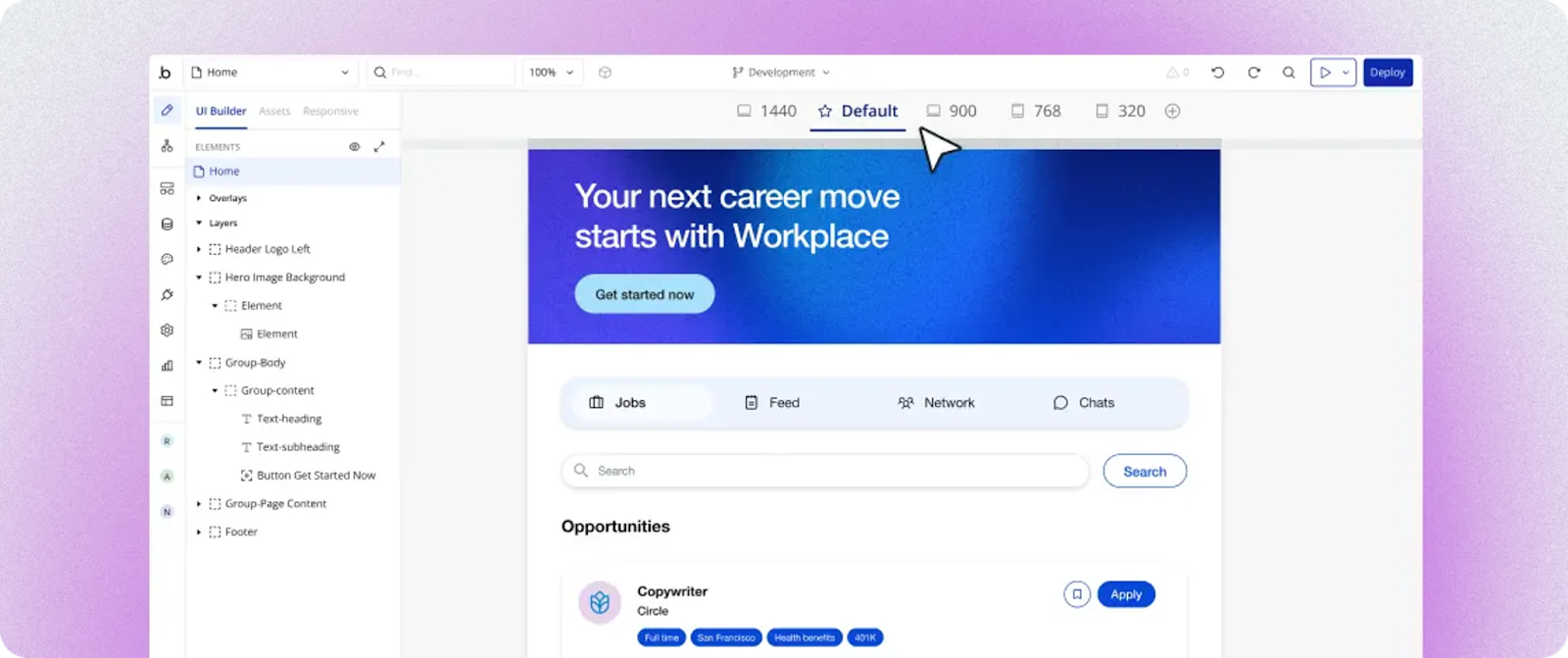
Bubble uses AI + visual editing: Generate complete apps instantly, then chat with the AI Agent or edit directly in the visual editor for precise control.
For example, you can ask the Bubble AI Agent to create a button, then adjust its styling directly in the visual editor — or create it yourself by dragging the "button" element from the sidebar. Popup menus let you adjust padding, width, colors, and what happens when it's clicked — or the AI Agent can make these changes for you, all without code.
Cursor is primarily a developer-first tool that focuses on text-based code editing. While it offers powerful AI assistance, the core interface is a fork of VS Code, meaning you need to understand code to use it effectively.
Cursor has multiple AI modes including:
- Tab: A proprietary multi-line autocomplete model that predicts your next edits.
- Composer: A feature that allows for natural language editing to write and refactor code across multiple files.
- The Agent: Explores and writes code for you with autonomous multi-file edits.
- Ask: Read-only mode that lets you ask questions about your code without making changes.
- Debug: For tricky bugs with hypothesis generation and runtime analysis.
While Cursor's AI agent is good at code generation — boasting deep codebase understanding via embeddings — you still need to read and understand that code to test, debug, and add advanced functionality. This creates three critical failure points: settling for "good enough" because you can't implement precise features, and building tech debt you can't maintain.
Without any sort of visual support in the core IDE, Cursor is designed to speed up workflows for experienced developers and provide deeply integrated AI support into an environment similar to Visual Studio Code. Cursor particularly excels with JavaScript, Python, and TypeScript due to extensive training data, but it can work with any programming language including Java, C++, C#, Ruby, Go, Rust, Swift, C, and PHP.
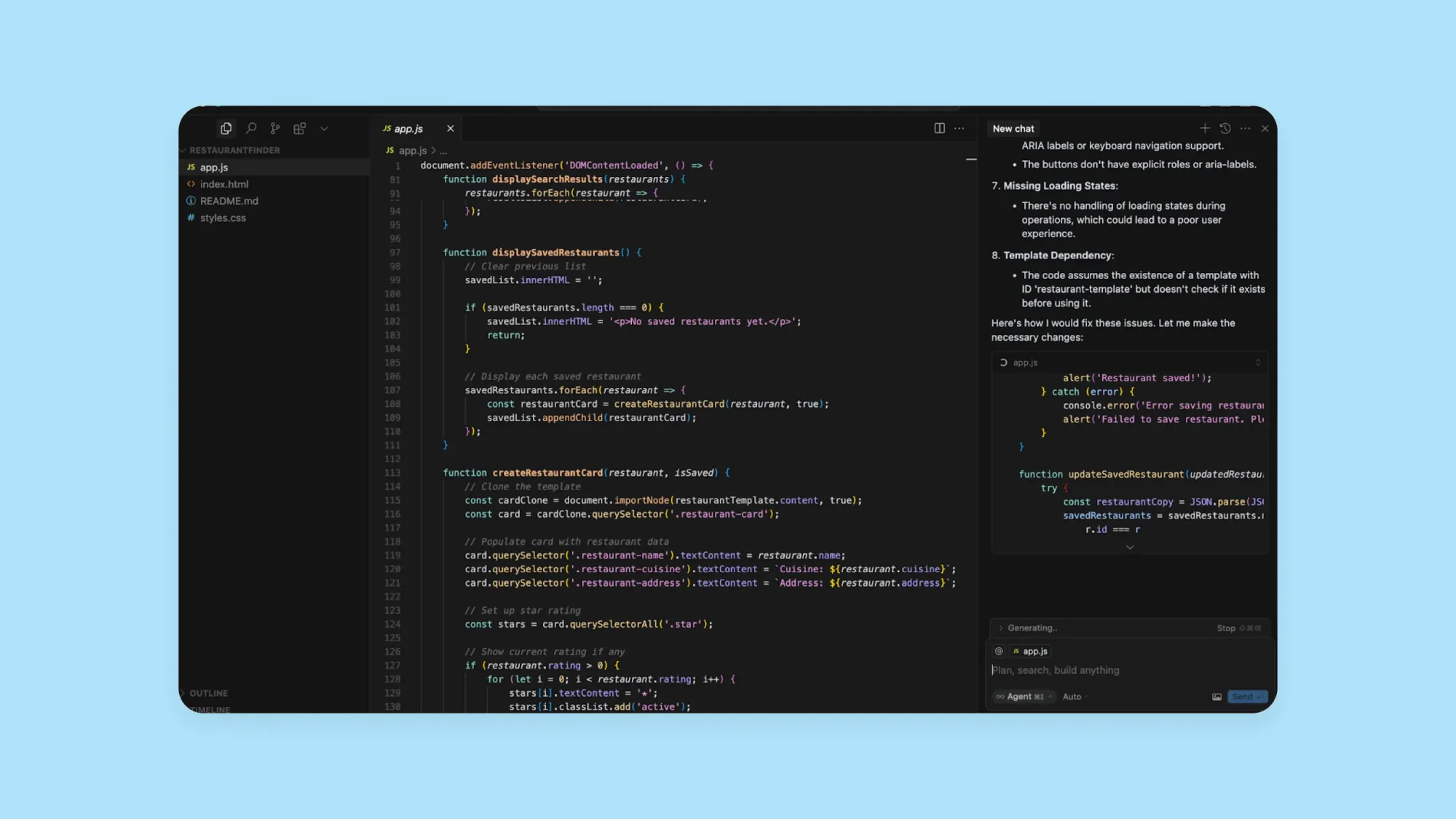
The real question isn't whether you can code — it's whether you want to understand and control what you're building. Some reviewers claim that you can build complex, functional apps in Cursor without coding knowledge. That may be true to some extent, but you’'ll be flying blind if you can’t understand the code the AI agent is generating for you. With Bubble, you're never flying blind.
In the long run, you'll have a steeper learning curve and less practical control with Cursor. This is where Bubble is fundamentally different: when AI can't help, you can always step in and edit visually yourself.
Platform vs. tool
Software is more than just code. To build and launch a fully-functional app, you’'ll need a database, a server for hosting and deployment, integrations with other apps, security, and more.
Bubble combines AI-powered app generation with a full visual development environment and enterprise infrastructure. Cursor is a tool for writing code faster and doesn't provide the backend, hosting, or deployment needed for a complete app.
Consider some of the other tools you’'ll need to get to a fully-functional app:
- DatabaseBubble has a built-in database with automatic privacy rules generated when the AI Agent creates data types. Your app's data is stored securely within Bubble without needing separate platforms. With Cursor, you need to set up and integrate external services for your database (like Supabase or Firebase), though Cursor provides integration mechanisms through MCP (Model Context Protocol) servers and extensions. You'll also need to understand what to set up, and how, or rely on AI to do so for you.
- IntegrationsIntegrations connect your app to other apps to extend functionality. For example, you might want your app to connect to Stripe to collect payments, or Google Maps to show search results on a map. Bubble has thousands of built-in plugins and integrations that are maintained by experts. On Cursor, you’'ll need to code your own (and keep up with updates manually).
- Hosting and deployment. Once your software is ready to go, you’'ll need somewhere to host your app for end users. On Bubble, the hosting (where your app lives) and deployment (how you move the code to the server hosting your app) process is one-click: Just click Deploy and you’'re ready to go live. On Cursor, you’'ll need to manage hosting on your own or work with a third-party hosting platform, and you’'ll need to export the code and deploy it manually.
Choose Cursor if: You're confident managing multiple services and tools to build a full-stack app. It's great for writing, debugging, and iterating on code faster.
Choose Bubble if: You want an all-in-one platform that handles design, data, logic, and deployment. You'll get your app live faster with less complexity.
AI capabilities
Both Bubble and Cursor use AI differently.
Bubble starts with AI-generated apps: Describe your app and get a functional V1 in minutes. The AI app generator creates frontend UI, backend databases with privacy rules and sample data, and workflows — all visual, never code. Then the Bubble AI Agent helps you keep building: Chat with it to add features, troubleshoot issues, and iterate, or switch to the visual editor whenever you want precise control.
You can see and test your app immediately, then iterate with AI or visual editing. The AI Agent is your partner throughout: It generates and edits elements, data types, workflows, and expressions; troubleshoots issues by analyzing your app; and teaches you Bubble as you build — all through conversational chat.
The AI Agent already helps you:
- Iterate on your app by chatting with the AI Agent — it generates and edits UI elements, workflows, data types, and expressions right in the editor
- Ask the AI Agent to troubleshoot issues — it analyzes your app context, identifies problems (like buttons without workflows), and helps diagnose why something isn't working
- Generate native iOS and Android mobile apps with AI — the AI app generator creates mobile-first UI, data types with sample data, and dynamic expressions, and the AI Agent can build workflows
If you want to use AI in your app — and not just to build it — Bubble's expert-maintained plugins allow you to integrate OpenAI LLMs like ChatGPT, and other LLMs like Claude, DALL-E, Grok, Gemini, and more into your app.
Cursor uses AI as a co-pilot for writing, debugging, and iterating on your code. It can serve as a researcher and resource to ask questions about your code (in Ask mode) or it can help you write, debug, and fix your code directly (Agent mode). Cursor's AI is good for:
- Writing and running terminal commands
- Reading linter output and attempting to fix lint errors after making code changes
- Making multi-line edits to your code using its proprietary "Tab" autocomplete model
- Providing autocomplete suggestions with the Tab feature
- Referencing and searching your code to help answer your questions, spot errors, and make improvements using codebase embeddings
- Switching between different models like Claude 3.5 Sonnet, GPT-4o, and others to find the best fit for your task
If you're looking for an AI assistant for coding, Cursor offers a great option. If you're looking to build and launch with visual control, Bubble is the platform for you.
Pricing comparison
Cost is a key factor when choosing a platform. Both Bubble and Cursor offer free plans to get started, but their pricing models are designed for different needs.
Bubble offers a free plan for learning and building, with paid subscription tiers that scale based on your app's usage and complexity. This model supports you from the initial idea all the way to a growing business with many users. You can build for as long as you want on the Free plan, and only upgrade when you're ready to launch.
Cursor provides a "Hobby" free tier with limited AI features including limited Agent requests and limited Tab completions. For professionals, Cursor offers several paid tiers.
The key difference: Bubble's pricing scales with your business growth, while Cursor offers both individual pricing and team-based pricing based on how much building you do. If you're building a business, Bubble's model aligns your costs with your success. If you're a developer looking to speed up your workflow, Cursor's individual or team pricing is straightforward.
Learning curve and getting started
The time to become productive depends entirely on your background.
With Bubble: The learning curve focuses on visual development concepts. You get immediate visual feedback as the AI creates elements and workflows in front of you.
Bubble is also home to both developers and builders without technical experience, so over the years, we've built out a huge library of educational materials for all levels and learning styles. Start with Bubble Academy, where you'll find interactive tutorials, written guides, one-on-one coaching, and bootcamps. If you already have technical experience, bookmark the Bubble manual for detailed documentation. And if you get stuck, reach out to our active community in the Bubble Forum for help.
Most new users can build and launch a simple app in days or weeks.
With Cursor: The learning curve is much steeper for non-coders. While intuitive for experienced developers who are familiar with VS Code (Cursor is a fork of VS Code), beginners need to learn programming principles to understand AI-generated code. Reviewers on platforms like G2 note that while the transition is seamless for existing developers, the tool assumes a level of technical knowledge that can be a barrier for true beginners.
If you're starting from zero technical knowledge, Bubble gives you a path to launch without learning to code. If you already know how to code, Cursor accelerates the work you're already doing.
Production examples and real-world use cases
The type of application you can build is a major differentiator.
Bubble is used to build marketplaces, social networks, internal tools, and SaaS products that handle real users and transactions. The visual editor gives you the control to iterate and scale from first users to millions without switching platforms or hiring developers. The goal is real apps that grow into real businesses, not just prototypes.
Cursor is best suited for developers working on specific coding tasks. Use cases include generating a script, building a component for a larger application, refactoring existing code across multiple files, or debugging a complex function. It's a powerful assistant for a developer's day-to-day work, with enterprises reporting over 100 million lines of code written per day using the tool. However, it is not a platform for building an entire business from the ground up unless you are also managing the infrastructure yourself.
If you want to launch a product and scale a business, Bubble is built for that. If you want to code faster within your existing development workflow, Cursor is designed for that.
Getting started with AI app building
Ready to build? Here's how to get started with each platform:
Getting started with Bubble:
- Describe your app idea — Tell the AI app generator what you want to build in plain language
- Review your generated app — The AI creates a complete first version with UI, database, and workflows
- Refine with AI or visual editing — Chat with the AI Agent to build workflows and add features, or edit directly in the visual editor for precise control - switch seamlessly anytime
- Deploy with one click — When you're ready, click Deploy and your app is live
Getting started with Cursor:
- Download and install — Set up Cursor on your machine (it's a fork of VS Code)
- Connect your codebase — Open an existing project or start a new one
- Use AI modes — Choose between Tab (autocomplete), Ask (questions), Agent (autonomous coding), Plan (detailed planning), or Debug (bug analysis)
- Set up infrastructure — Configure your database, hosting, and deployment separately
Bubble vs. Cursor: Which is right for you?
AI coding and no-code aren’t replacements for one another — they solve different aspects of the challenges of software development. AI coding tools can be a great way to speed up the process of spinning up V1 of your app, and can give experienced programmers super-speed as they work on code.
And for experienced developers, Bubble can still be a game-changer. Combining AI generation with visual development makes the entire process faster than traditional coding — without losing control or functionality. You don’t have to manage servers, balance loads, do endless debugging, or manage other technical details during iterations. You get the power of code, without the tedious work of coding every element line-by-line. And you can add custom code if you want, too.
| Bubble Pros | Bubble Cons |
|---|---|
| ✅ AI + visual development for every aspect of your app (design, data, and logic) makes building apps accessible for anyone — chat with AI when you want speed, edit directly when you want control. | ❌ Developers may prefer traditional coding environments that feel familiar and use code directly. |
| ✅ AI can spin up the first version of your app in minutes for web or native mobile, complete with functionality and sample data. | ❌ The Bubble AI Agent (beta) is still improving — some capabilities like editing complex workflows aren't as strong as others, and it's not perfect yet. |
| ✅ Stay in control the whole time, even if you don't know code. | |
| ✅ Get built-in security features and automated vulnerability checks, so you can take your app live faster and feel confident your data is secure. | |
| ✅ All-in-one platform gives you everything you need to build, launch, and scale a fully-functional app. | |
| Cursor Pros | Cursor Cons |
| ✅ Not locked into a single platform... | ❌ ...but you need to set up and integrate external services for your tech stack (frontend frameworks, database services like Supabase or Firebase, hosting platforms, etc.), though Cursor provides integration mechanisms through MCP servers and extensions. |
| ✅ Access to the underlying code with deep codebase understanding via embeddings. | ❌ You need to be confident and comfortable working with code to build a scalable app. |
| ✅ Familiar VS Code environment for experienced developers with multi-model support (Claude, OpenAI, etc.). | ❌ Steep learning curve for non-coders and potential billing friction for individual users. |
| ✅ Flexibility for any programming language. | ❌ Can be resource-intensive, with some users reporting high memory usage. |
Whether a feature is a "pro" or "con" depends on your needs and experience.
Cursor is better for experienced developers who want AI integrated into their development environment. When you’'re working with existing tech stacks and familiar languages, Cursor provides a flexible environment with an AI co-pilot. It helps speed up workflows and tedious coding tasks.
Bubble is best for anyone who wants to build and scale businesses, not just apps. It's the only fully visual AI app builder that lets you vibe code without the code to launch real products, not prototypes. Chat with AI when you want speed, edit directly when you want control.
Anyone can create production-grade apps without coding. The AI app generator eliminates the blank page, the AI Agent helps you build and troubleshoot as you go, and you get full control through visual editing anytime you need it—switch seamlessly between AI and visual editing.
Plus, you get built-in hosting, an all-in-one platform with a strong database and integrations, a huge community with tons of resources, and a platform you can understand without a technical background, which makes managing and scaling all aspects of your app accessible for anyone.
Compare Bubble with other AI builders:
Start building with the right tool for your needs
If you're a founder or builder focused on launching a real app, Bubble provides the complete platform: AI generation for speed, visual editing for control, and enterprise infrastructure for scale. If you're a developer looking to speed up your coding tasks, Cursor is a powerful sidekick.
The best way to know for sure is to try it yourself. See how you can vibe code without the code and get started for free on Bubble today.
Frequently asked questions about AI app builders
Do AI app builders actually work for real businesses?
Yes — but results vary dramatically by platform. Some generate prototypes that can't handle real users, while Bubble is used by startups and Fortune 500 companies to build production applications with complex databases, workflows, and security.
What happens when the AI can't build what I want?
With code-generating tools, you're stuck in prompt loops trying to fix code you can't read. With Bubble, you can always step in and edit directly yourself — you're never stuck.
Can I really build an app without any coding experience?
With Bubble, absolutely. The AI app generator creates complete, working apps from your description, the AI Agent helps you build workflows and add features, and the visual editor lets you understand and control everything without code. Thousands of non-technical founders have built and launched real businesses on Bubble. With Cursor, you can generate code without knowing how to write it — but you'll struggle to debug, customize, or maintain it when something breaks.
How do AI app builders compare to traditional development?
AI app builders dramatically accelerate the early stages — you can go from idea to functional app in minutes instead of months. The difference is what happens next. Traditional development gives you full control but requires significant time, money, and expertise. Code-generating AI tools speed up coding but still require you to understand code. Bubble gives you AI speed plus visual control, so you can build, iterate, and scale without the traditional development bottlenecks.
What types of apps work best with AI builders?
AI app builders like Bubble excel at marketplaces, SaaS products, internal tools, social platforms, and mobile apps — essentially any application with user accounts, databases, and business logic. They're particularly powerful for validating ideas quickly and scaling successful products. The main limitation is highly specialized applications requiring custom hardware integration or extremely niche technical requirements, though even these can often be built with custom code extensions.
Is Cursor good for beginners with no coding experience?
Cursor is designed for developers who already know how to code. While a beginner could use it to generate code, they would struggle to debug, customize, or maintain it without understanding the underlying programming language. With Bubble, you see exactly how your app works in visual workflows, the AI Agent helps you build workflows and troubleshoot, and you can always edit directly yourself — you're never stuck.
Can Bubble handle complex, enterprise-level applications?
Yes. Bubble is built on enterprise-grade infrastructure and is SOC 2 Type II compliant. It's used by startups and Fortune 500 companies to build and scale mission-critical applications with complex databases, workflows, and security requirements.
Which tool has better long-term scalability?
For scaling a full application and business, Bubble is the clear choice. It includes auto-scaling infrastructure, database management, and security from day one. Cursor's scalability depends on the developer's ability to build and manage a scalable architecture using the code it helps generate.
How do the AI features compare in practical use?
Bubble's AI generates a complete, functional first version of your app for web or native mobile — including the database, UI, and workflows — then the Bubble AI Agent continues helping you: build workflows, add features via chat, troubleshoot issues, or edit directly in the visual editor for precise control. Cursor's AI acts as a co-pilot within a code editor, generating and debugging code you have to read and understand yourself.
What happens if I outgrow my chosen platform?
With Bubble, you can scale from a free plan to a dedicated enterprise cluster that can handle millions of users without ever switching platforms. With Cursor, you own the code generated with AI assistance and can host it anywhere, but you are also responsible for managing all infrastructure and migration yourself.
Build for as long as you want on the Free plan. Only upgrade when you're ready to launch.
Join Bubble