TL;DR: This comparison of three AI app builders—Replit, Bolt, and Bubble—reveals that while Bolt targets experienced developers with code-first AI assistance and Replit offers AI-supported coding for learners, Bubble stands out as the only fully visual platform that lets users build real apps without getting stuck in code, offering enterprise-grade security, extensive integrations, and the ability to seamlessly switch between AI generation and visual editing for maximum control at any skill level.
AI app builders are evolving fast, with new platforms launching every week. We tested three leading options — Replit, Bolt, and Bubble — to see what each does best and which delivers the most value for real projects.
Replit is a mature, all-in-one programming environment and AI chatbot that lets you code (or generate code via AI), iterate, collaborate, and host your app all in one place. It's slightly more accessible than Bolt for non-developers, offering a built-in backend, an easier-to-use AI Agent, and strong built-in security and collaboration features.
Bolt integrates AI building with traditional coding in a code-first editor. It brands itself — and works well — as an AI assistant for developers looking to speed up familiar tasks and generate new code quickly, rather than starting from a blank page. It offers slightly easier mobile app development and is a bit faster at making iterations and complex features compared to Replit.
Bubble is the only fully visual AI app builder that lets you vibe code without the code to launch real apps to real end-users. You can chat with AI when you want speed, edit directly in Bubble's visual editor when you want control, and switch seamlessly between them anytime. Unlike AI coding tools that generate code you can't read, you're never stuck — you can see exactly how your app works, fix issues yourself.
Bubble also offers an all-in-one platform, giving you strong security, collaboration features, and built-in databases, hosting, integrations, and design tools suited to developing businesses — not just prototypes.
In this article, we compare all three platforms, including the benefits, the drawbacks, and the best use cases for each. We'll cover how AI app builders work, what technical expertise each requires, output quality, development workflows, and everything else you need to make an informed decision. If you're curious to see a deep dive into each platform individually, check out our other comparisons:
Replit vs. Bolt vs. Bubble: Key factors
Even the best AI output requires editing and iteration before it's ready to launch and scale. The difference is how much control you have over that work and what happens when AI can't deliver exactly what you need.
- Replit and Bolt take a code-first approach. The AI focuses primarily on generating code, which you can then edit and iterate on either manually or via the AI chat.
- Bubble generates visual apps you can edit directly — not just the design, but every single part of your app, including the database, privacy rules, and logic workflows.
The code-first approach creates a major roadblock for non-developers. Builders with coding experience can edit manually when AI gets stuck, but non-coders get trapped in prompt loops — endlessly prompting without getting the results they want.
In our comparison, we considered how each platform helps you iterate, customize, and fix issues throughout the building process — not just during initial generation. Here’s a quick breakdown of how the platforms stack up:
| Factor | Replit | Bolt | Bubble |
|---|---|---|---|
| Initial output quality | ⭐⭐⭐💫 | ⭐⭐⭐ | ⭐⭐⭐⭐ |
| Design capabilities | ⭐⭐ Responsive design with Visual Editor for limited direct element manipulation. Agent can generate UI assets and images. |
⭐⭐⭐ No drag-and-drop editor. Fast design iteration and quality via AI chatbot are both strengths. |
⭐⭐⭐⭐ Responsive design and visual editor for pixel-perfect control. Bubble AI Agent generates and edits UI elements, expressions, workflows, and data types. |
| Native mobile app support | ⭐⭐⭐⭐ Generate React Native mobile apps with AI and deploy via Expo. (Code editing required for complex logic.) |
⭐⭐⭐⭐ Supports mobile app development via Bolt + Expo integration, allows use of the AI chat for development. |
⭐⭐⭐⭐ Build truly native mobile apps with AI and deploy to the Apple App Store and Google Play. Share backend and data with your web app. |
| Collaboration | ⭐⭐⭐⭐⭐ Full IDE with GitHub integration. Replit Teams offers granular permission controls including Owner, Publisher, Editor, and Viewer roles. |
⭐⭐⭐ Team plans with real-time editing, role-based permissions with granular admin controls, and team-level access management. |
⭐⭐⭐⭐ Real-time team editing with granular role-based permissions and built-in version control—all without complex setup or third-party integrations. |
| Backend and database support | ⭐⭐⭐ Built-in Replit Database (serverless SQL), setup can be confusing for nontechnical users. |
⭐⭐⭐⭐ Built-in serverless SQL database with unlimited databases and authentication management; also supports external APIs (Firebase, Supabase) for additional functionality. |
⭐⭐⭐⭐⭐ Native backend and database that doesn’t require technical expertise or extra costs to set up. |
| Security and compliance | ⭐⭐⭐ Strong platform-level security (SOC 2 compliant), but app-specific security is up to the developer and has to be coded manually. |
⭐⭐⭐ Built-in security features including pre-deployment scanning, secure-by-default settings, and data encryption for managed database and hosting services. |
⭐⭐⭐⭐ Enterprise-grade security features, including SOC-II and GDPR compliance, advanced encryption and monitoring, and custom privacy rules. |
| Deployment/hosting | ⭐⭐⭐⭐⭐ One-click deployment and native hosting via Google Cloud infrastructure. |
⭐⭐⭐⭐ One-click deployment with built-in hosting and free .bolt.host domain; optional third-party hosting through Netlify also available. |
⭐⭐⭐⭐⭐ One-click deployment and native hosting. |
| Technical expertise | ⭐⭐⭐ Best for moderately technical users (technical background helpful). |
⭐⭐⭐ Best suited for users with at least moderate technical expertise. |
⭐⭐⭐⭐⭐ Best for all skill levels. Edit visually, whether you're a developer or complete beginner. |
How AI app builders work
Most AI app builders work the same way: describe your app in plain English, and AI generates a starting point in minutes—including user interface, database structure, and basic workflows.
The key difference is what happens next:
Getting started with AI app building
If you have an idea, you're already halfway to building an AI app. Here's how to approach it:
- Clarify your idea. What is the main problem your app will solve? Who is it for? What are the one or two most important features it needs to have? Keep it simple to start.
- Write a clear prompt. Describe your app to the AI like you would to a friend. For example, instead of just "a to-do list app," try "a to-do list app for busy parents that lets them create tasks, assign them to family members, and set due dates."
- Review what the AI builds. Don't expect perfection on the first try. Look at the pages, the database, and the features the AI created. This is your starting point, not the final product.
- Refine and iterate. Add features, adjust designs, or fix issues—make progress at your own pace.
The best way to learn is by doing. Pick a simple idea, give it a try, and see what happens. You might be surprised how quickly you can go from concept to something real.
Required technical expertise
Before diving into the details of each platform, it's important to consider how much technical expertise each one requires to take your app all the way to launch and beyond. Most AI app builders make it easy to get started.
Each platform requires different technical expertise:
- Bolt assumes the most technical expertise and targets developers
- Replit assumes technical familiarity while offering AI assistance for beginners
- Bubble is equally accessible for developers and non-developers, with the most control for non-coders
Bolt requires the most technical expertise to build functional apps. The Bolt team recommends learning coding basics before starting. Setting up databases or adding complex functionality requires technical knowledge or heavy reliance on inconsistent AI that quickly burns through tokens. While Bolt uses advanced models like Claude 4.5 Sonnet to handle logic, you still need to understand the underlying code when the AI hits a wall.
Replit also assumes some technical familiarity, but it provides more AI support and scaffolding for beginners who are looking to learn. Their educational materials, like the "100 Days of Code" challenge, are more geared toward beginners. The interface is a bit more intuitive than Bolt's, and overall, the Replit platform is a bit more streamlined.
It can also be a great way for those who are interested in learning code to "learn by doing," with the help of an AI coach to build alongside them, help troubleshoot, and take them step-by-step through the process. That said, you will need to learn some code at some point to build a fully functional and scalable app on Replit.
Bubble's visual editor lets you see exactly how your app works — in visual workflows and data structures you can understand. The AI Agent teaches you as it builds, so you can edit visually whenever you need precision. Understanding what you build is a feature, not a limitation.
App output quality
Each platform has different output strengths:
- Bolt has the most complete output when it works, but inconsistent performance and rate limits
- Replit has more limited but consistent output, with strong AI iteration capabilities
- Bubble has the best visual output with working features, plus seamless switching between AI Agent for iteration and visual editor for direct control
Bolt generated great UI and good functionality in the initial output, leveraging the Claude 4.5 family of models. When it did work, the UI was solid, the functionality worked and was more complete compared to Replit, and it was easy to prompt and change the look and feel of the app.
The major downside is that sometimes Bolt didn’t work. There were several tests where the functionality was quite limited, or the visual preview wouldn’t load, or the code had errors that Bolt couldn’t find or resolve. While Bolt claims "98% fewer error loops," real-world usage often involves hitting roadblocks that require manual coding to fix.
And in one test, Bolt didn’t even finish generating an initial output of our app before we were blocked by the daily rate limit. Bolt's Free plan includes up to 1 million tokens per month, but with a daily cap of roughly 300,000 tokens, it wasn't clear how many tokens our prompt(s) were going to use or how quickly we’d hit those limits. This is a common problem mentioned in the Bolt forums as well, and makes for a frustrating experience.
By contrast, Replit produced a more limited output initially, but was more consistent. It generated both frontend and backend features, but the UI and the functionality were more limited compared to Bolt. In general, Replit needed more “hand-holding.” That is, we needed to prompt it step-by-step to get the functionality we wanted. But when it did create that functionality, it was more consistent than Bolt, thanks in part to its Agent V3's autonomous testing capabilities.
Bubble was strong across the board, producing both solid UI and functionality. Bubble stands out because it gets you started in every area — design, data, and the logic that powers your app behind the scenes. Because Bubble has a built-in backend, the features and functionality actually worked from the initial output. Plus, Bubble takes a visual approach to the output and editing. Instead of a code-first editor, Bubble uses a drag-and-drop editor that makes it easier to preview and edit your app visually. Bubble was also much more consistent compared to Bolt.
App development workflow
All three of these apps take a similar approach to initial app development, but they have different strengths.
Replit and Bolt have very similar approaches to app development. First, you’ll prompt the AI, then it will take you to a split-screen view with the AI progress and chat on the left-hand side, and an integrated coding environment and visual preview on the right-hand side.
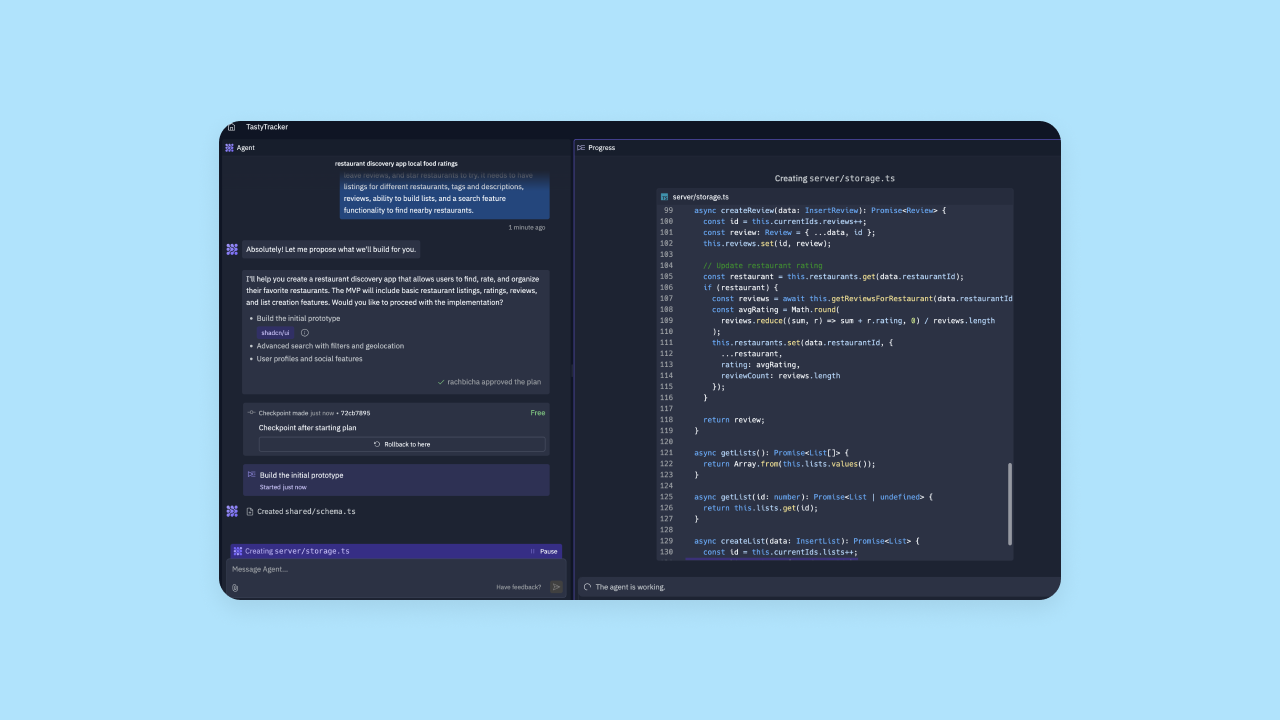
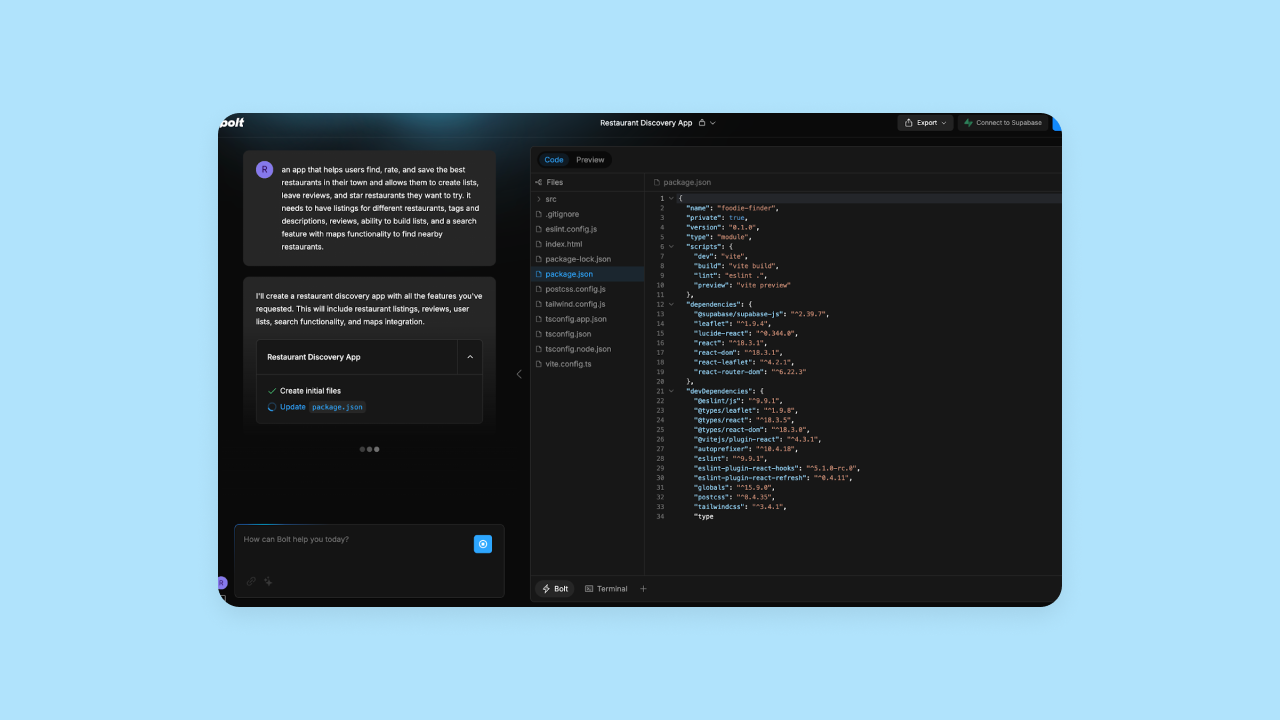
On Bolt, our visual preview often got stuck and wouldn’t update, and the AI chat didn’t seem to know how to resolve this. Bolt uses StackBlitz's WebContainers technology to run a Node-like environment directly in the browser, which is impressive but can occasionally lead to these sync issues.
We found Replit's AI chat to be slightly better than Bolt’s at identifying and adjusting errors and adding new functionality. Bolt’s editor is slightly more code-forward.
Another great feature of Replit’s app development process is that before it generates code, it will give you a project plan of what it’s going to build and suggest additional functionality that you can choose to add (or not) to your initial output. Bubble also includes this step in its development workflow.
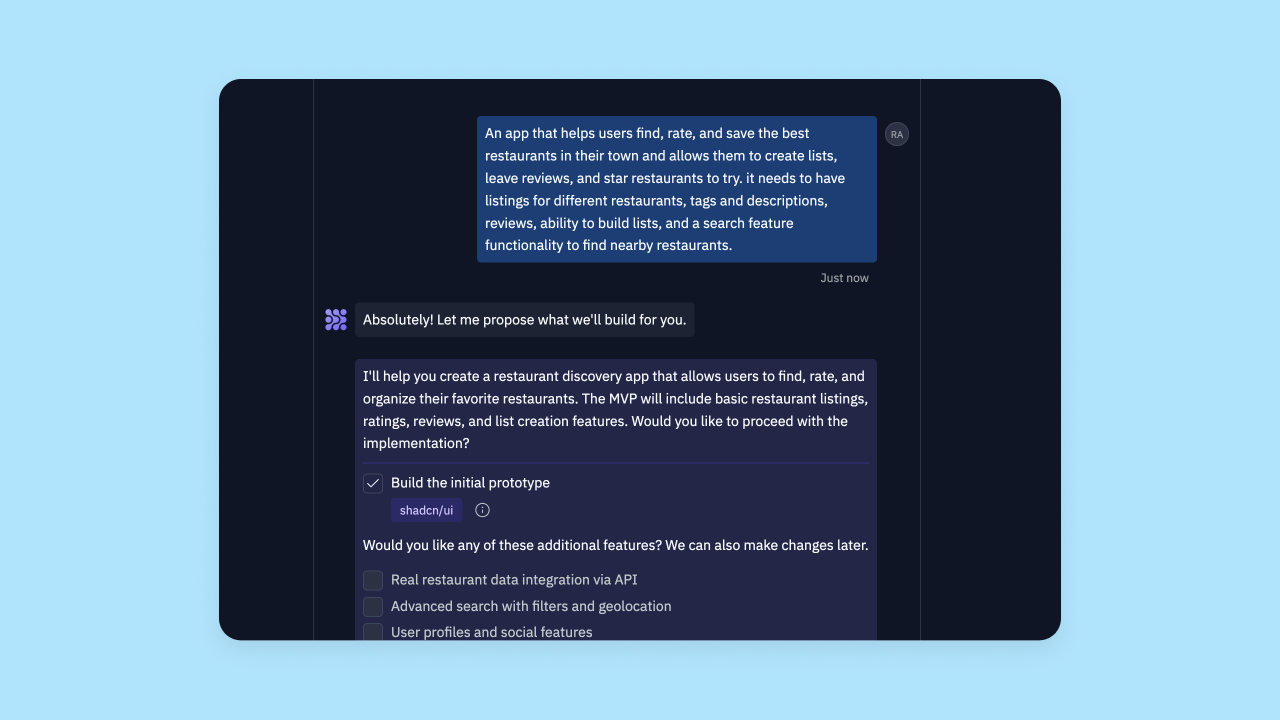
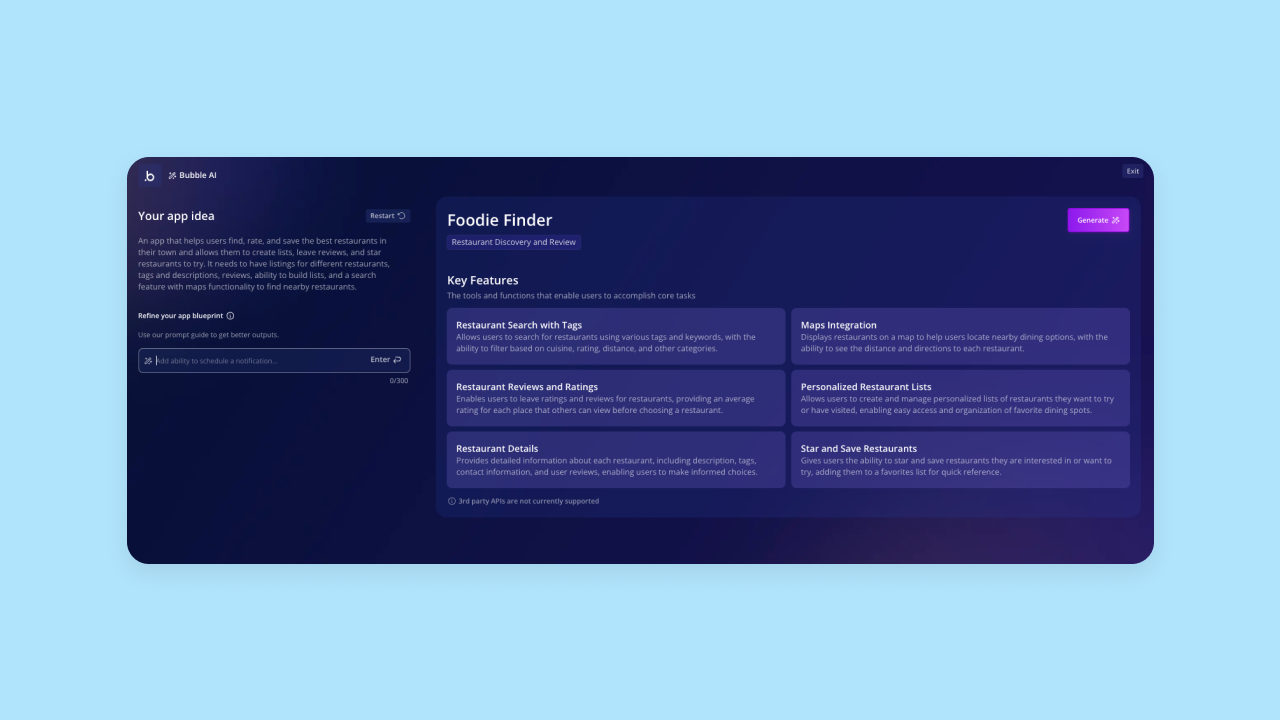
However, on Bubble, after you’ve prompted the AI and approved the project plan, you don’t get a split-screen view. Instead, you’re taken directly to the visual editor, where you can preview your app and edit it directly all in one place.
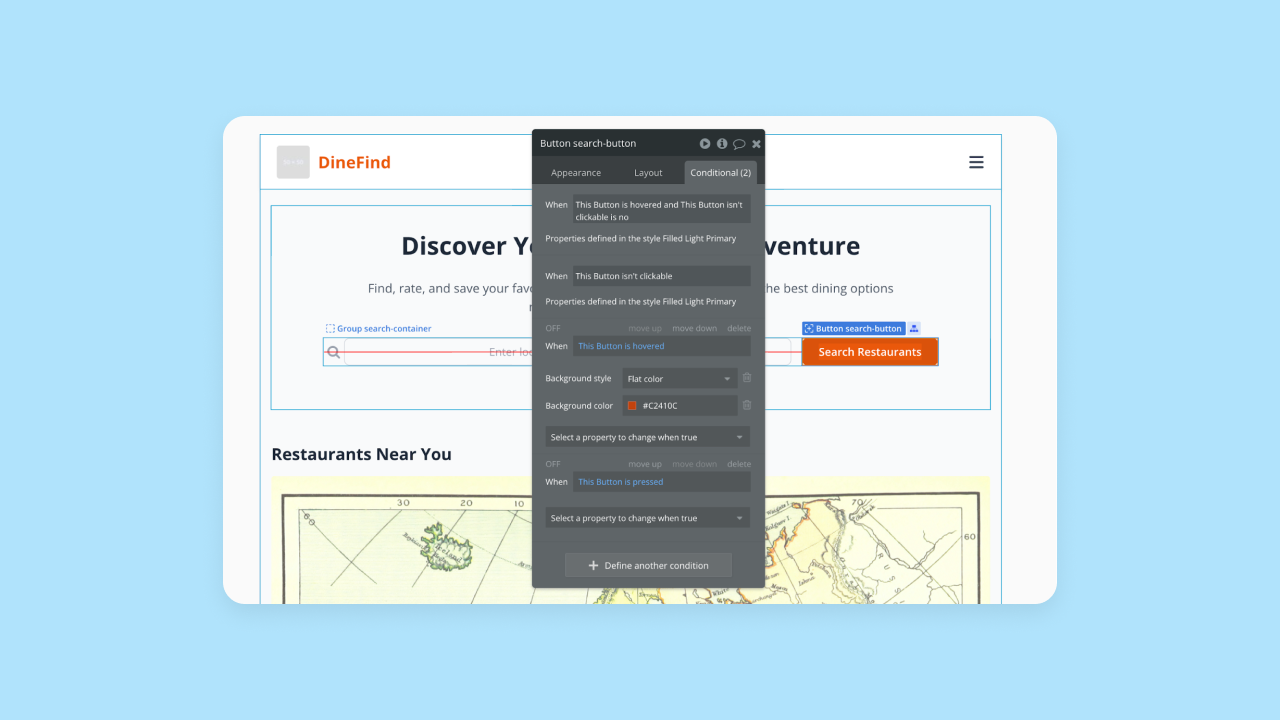
For example, in Replit or Bolt, if you want to edit what a specific button does, you have to find that section of code and edit it manually, or prompt the AI to fix it (which can deliver inconsistent outputs). On Bubble, you simply click on that button in the visual preview, then set up a workflow that follows a simple if-then structure.
Customizability
The good news: Replit, Bolt, and Bubble all offer a high level of customization. The difference comes in how you customize your app once it’s generated.
For Replit, the primary means of customization is through Replit Agent, which offers multiple modes: Build mode for creating and iterating on code, Plan mode for brainstorming and planning without code changes, and Edit mode for targeted modifications. This approach gives you access to more LLM models that can help you get better output for different tasks, making Replit a bit more approachable for beginners compared to Bolt. Of course, you can also edit the code directly and make any changes exactly as you want them.
Bolt’s limited token rates mean that AI-driven iteration and customization are pretty limited. We usually hit rate limits quickly (the free plan caps at roughly 300,000 tokens per day), which means that you need to be comfortable with traditional coding to develop quickly in Bolt and have full access to customization.
One other thing to note is that both Bolt and Replit’s AI struggle with the same issues as most of today’s AI builders — occasionally bloated code, being unable to find or fix errors, and just delivering somewhat unpredictable output. If you’re trying to create your app solely through the AI chat, you will have less control overall on Replit and Bolt than if you have the experience needed to edit your code directly.
On Bubble, all customizations happen visually, via the drag-and-drop editor. You get the same unlimited customization as with traditional coding, but without actually having to code. You have full control over UI design, workflows, triggers, actions, data types, database structure, conditionals, and more. Plus, you can add reusable styles and elements to further speed up your design and development.
Design functionality
Neither Bolt nor Replit are very design-focused platforms, but Bubble takes a very intuitive approach to design. However, all three platforms offer the ability to create well-designed apps, depending on your level of experience.
Replit offers both code-first development and a Visual Editor that allows direct manipulation of UI elements with live preview. While less comprehensive than Bubble's visual approach, Replit provides visual editing capabilities alongside its AI-enabled coding environment. You can prompt Replit’s AI agent with an image, a screenshot, or a Figma file and it will attempt to build out that interface in code. The Agent can even generate images and UI assets directly.
Bolt takes a similar approach, and also offers a direct Figma integration as well. We also found Bolt’s AI pretty apt in making design-focused changes — one or two prompts was generally enough to change the entire look and feel of the app. However, as with other iterations on Bolt, we often hit token rate limits quickly, which prevented us from making further changes to our app unless we coded them manually or upgraded to a higher pricing tier.
Bubble combines AI-powered design generation with a visual editor for pixel-perfect control. It’s super flexible, and gives you complete control over every pixel — without having to prompt an AI tool or write code. Just drag and drop, create manual breakpoints and layouts, develop responsive designs, and make customizations exactly how you want them, all visually. And yes — you can import Figma wireframes or other design tool mockups into Bubble and Bubble will convert them seamlessly into a functional app. You can also create complete design systems on Bubble with reusable UI components, custom styles, and everything you need for cohesive, aesthetic apps.
Although Bolt and Replit offer full design customization through traditional coding, Bubble’s visual approach is a much more manageable way to design your app, particularly for non-coders.
Collaboration
If you’re looking to build, launch, and grow an app for enterprise use or end-users, collaboration on your platform of choice is key for moving and iterating quickly. Bubble and Replit provide the strongest collaboration features. Bolt also makes collaboration possible via GitHub and StackBlitz.
All three of these platforms offer basic collaboration features, such as:
- Adding collaborators to your project or app
- Choosing which of your projects collaborators can access
- Providing team plans and version control
One key difference is the level of control you get with access permissions. Bolt offers team-level access management with role-based permissions and granular admin controls. Replit Teams offers granular permission controls including Owner, Publisher, Editor, and Viewer roles with varying levels of access. Bubble has the most customizable access permissions, allowing you to control edit access for different spaces (like UI vs. databases).
In addition, Replit and Bubble provide real-time collaboration in the editor with live cursors, so you can see your teammates and their work in real time. Bolt now offers real-time editing capabilities through their Teams plan, along with inline chat and code comments.
Finally, the teams plans vary in cost on each platform as well:
- Replit team plans start at $35 per user per month when billed annually (or $40 per month when billed monthly), plus additional pay-as-you-go billing for usage.
- Bolt team plans start at $30 per user per month, with 10 million monthly tokens included for each user.
- Bubble team plans start at a flat-rate $119 per month, with hosting and a built-in database included. Bubble also doesn’t charge extra for AI generation.
Security
You’ll want to consider what platform-level security is offered (the security of the platform you’re building on) and what app-level security is offered (the security of the app you’re building for your data and end-user data). For users without a technical background, it’s also important to consider how much security is “built-in” vs. what you’ll be expected to implement yourself.
Bolt provides built-in security features including pre-deployment scanning, secure-by-default settings, and data encryption for their managed database and hosting services. Bolt also integrates with Stripe for payments, leveraging Stripe's robust fraud protection. However, app-level security implementation still depends on how developers build their applications.
Replit offers strong platform-level security, but leaves app-level security up to the builder. Replit itself is SOC 2 Type II compliant, GDPR compliant, and offers security features like end-to-end encryption, 2FA, and SSO, offering compliance for your data. However, Replit doesn’t offer built-in privacy rules, role-based access, or integrated end-user authentication, leaving your end-user data potentially exposed or unsecured. Without any security guidance or guardrails for non-coders, building a secure app on Replit is possible, but it requires technical expertise to code privacy rules and settings for your app manually.
Bubble provides the strongest “built-in” security, plus step-by-step guidance for non-coders. You get enterprise-grade security features like SOC 2 Type II compliance, GDPR compliance, enterprise-grade infrastructure and encryption, DDoS protection, and more. Basically, these certifications and standards mean Bubble’s platform itself is a secure place to launch and grow an app for business use.
Plus, Bubble also offers built-in user authentication and makes it simple to set up custom privacy rules and restrictions specific to your app and data types through the visual editor. This way, it’s much easier to keep your customer data safe, since you won’t have to code, and Bubble provides lots of guardrails for non-developers to help guide you through the process.
Bubble even offers additional security features and automated vulnerability testing through the security dashboard, making it easier to build a secure app even if you’re not an expert.
Native mobile app creation
Luckily, all three of these platforms support mobile app development: Replit supports React Native and Expo app development, Bolt uses Expo, and Bubble offers native mobile app functionality directly via Bubble’s no-code editor.
Replit and Bolt’s mobile app development mirrors their web app development process, so their processes are pretty similar. You add the Expo framework template to your editor in Replit or Bolt, then use the AI chat as usual to prompt for functionality and design. You can edit the code manually or iterate via AI chat. We found Bolt’s AI slightly better at interpreting our prompts compared to Replit.
Bubble also offers native mobile app functionality (beta). Bubble takes a no-code approach, offering one of the only true no-code builders for native mobile apps. Use the visual editor to build, iterate on, and launch your mobile app, which has a much lower learning curve. Your apps will also share a backend, eliminating the need to duplicate databases and logic that powers both apps. Plus, you can publish your app directly to the Apple App Store and Google Play Store right from the Bubble editor.
Integrations
The key factor to consider with integrations on any AI app-building platform is:
- How robust their integrations library is
- How easy the integrations are to use
- Who “owns” the maintenance and updates for integrations
Bolt offers integrations including Supabase and Firebase for databases, built-in Bolt hosting (with optional Netlify deployment), GitHub for version control, Expo for mobile apps, Figma for design, Stripe for payments, and Google SSO for authentication. Bolt also features "Pica," which allows natural-language connectivity to over 170 SaaS tools like HubSpot, Notion, and Shopify. If you need something beyond what they offer, you’ll have to code your own, which can be tricky.
Replit provides built-in integrations as well that are super easy to access and use right from the Replit editor. They have more built-in integrations than Bolt, including Slack, Discord, Hubspot, Stripe, Google Sheets and Docs, OpenAI, Anthropic, and a few others. Through their acquisition of OpenInt, Replit now offers "Connectors" that give the Agent secure, code-level access to external services. If you need something beyond their built-in list, you can configure your own manually or via the AI editor.
Bubble offers the largest integration library by far, with thousands of built-in and expert-maintained plugins. On Bubble, you get “one-click” integrations with tools like:
- OpenAI and Chat-GPT 4
- Anthropic Claude AI
- DALL-E
- Github
- Figma
- Stripe
- Paypal
- Plaid
- SendGrid
- Google Suite products
- and thousands more
Bubble’s plugins are built and maintained by expert developers, who know how to create custom functionality and maintain it. Like the official integrations maintained by Replit and Bolt, Bubble’s massive integration library “just works” with the platform. If you need something else, you can also build your own integrations via Bubble’s API connector. This allows anyone to easily connect your app on Bubble to basically any other external app or system without having to custom code integrations.
Deployment and hosting
All three of these platforms make deployment and hosting pretty simple, but there are some differences to consider.
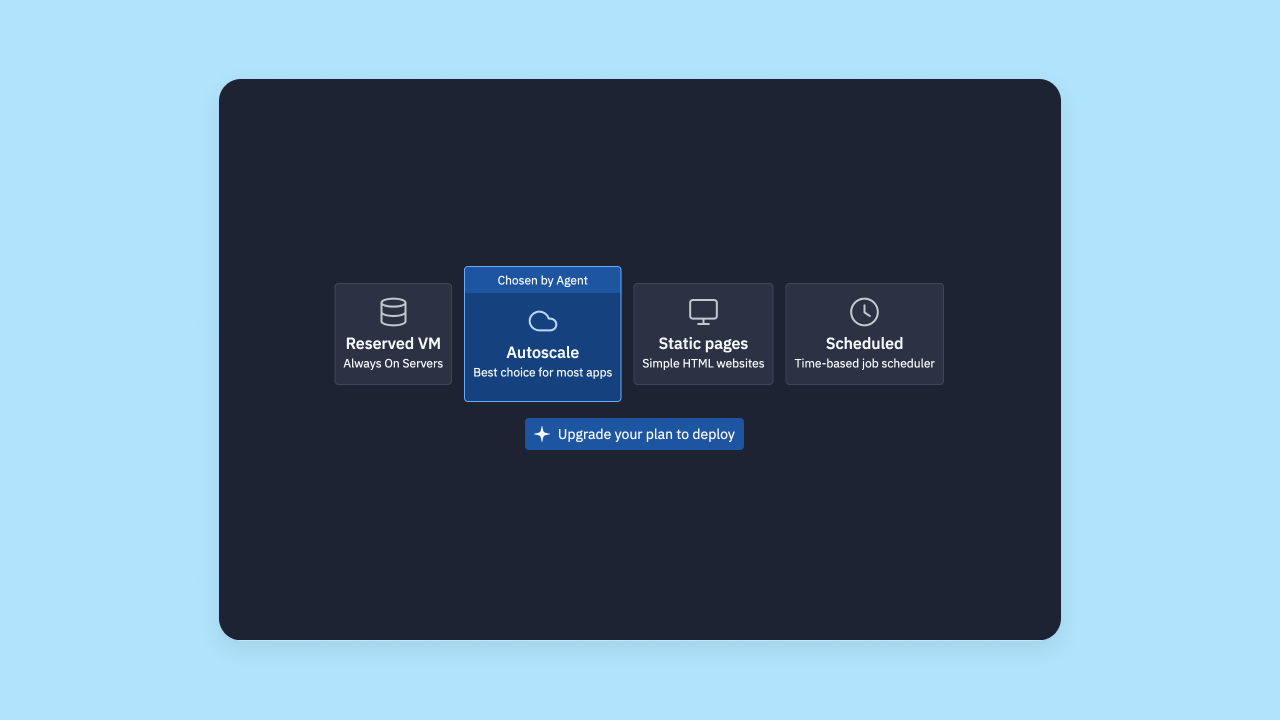
Replit has built-in hosting, but the process isn’t as streamlined as Bolt or Bubble. They provide multiple deployment options, including Autoscale Deployments for efficiency and Reserved VMs for dedicated resources, which can be helpful for developers, but confusing for non-programmers who just want a simple launch. Also worth considering: Publishing your app through Replit forces an MIT license currently, which eliminates the privacy of your software. Private deployments are only available on higher-paid tiers.
Bolt offers built-in hosting with a free .bolt.host domain included. All new projects are published using Bolt hosting by default, though users can optionally choose to deploy to Netlify instead. You can also export code for self-hosting.
Bubble makes the process the simplest of all, with built-in hosting and deployment on Bubble servers. Deployment and hosting is truly “one-click” and you get to keep everything in one place. Even better: only one platform and account to juggle and pay for!
Education
Bolt has the most limited education resources of these three platforms. They offer some technical documentation, but it's sparse—mostly limited to a brief overview of the platform, prompting techniques, and a few tutorials around integrations and specific use cases. They have a YouTube channel as well, which is also pretty sparse. If you get stuck building with Bolt, it can be tough to troubleshoot from their documentation alone.
Replit has a lot more resources, comparatively. They have more detailed documentation surrounding the platform, features, how-to guides, integrations, and a number of tutorials and walkthroughs. Their educational content, including the "100 Days of Code" challenge and Replit Guides, is beginner-focused, helping you get the most from the platform even if you don’t have a technical background. They’re also building out a solid YouTube library with general tutorials and videos on specific workflows and tasks in Replit.
Bubble has the most resources of the three — with comprehensive education and documentation geared toward all skill levels and different learning styles. The core of Bubble’s education is in the tutorials, how-to guides, courses, interactive lessons in the Bubble Academy, plus the Bubble Manual, which provides detailed and comprehensive documentation of the entire platform for both beginners and experienced developers.
However you like to learn, and wherever you are in your app building journey, you’ll find support and educational resources from Bubble. And if you still find yourself getting stuck, you can turn to the active Bubble forums for help from experienced builders.
Which AI builder is right for you?
Choose Bolt if you:
- Are an experienced developer comfortable with code-first environments
- Want to integrate AI with existing GitHub/StackBlitz workflows
- Have budget for higher-tier plans to avoid rate limits
Choose Replit if you:
- Want to learn coding with AI assistance
- Need built-in hosting and stronger platform security
- Prefer consistent output over maximum features
Choose Bubble if you:
- Want to vibe code without the code — AI speed without getting stuck with code you can't read
- Need to launch real apps, not just prototypes, with enterprise infrastructure built-in
- Want visual control over every layer so you can build exactly what you envisioned
Replit and Bolt are both AI-powered app generators paired with editors that merge code-based development with AI-driven iterations. Both can generate frontend and backend code, offer full customization via manual coding, and support collaboration and mobile app creation. However, despite the similarities in their interfaces and app development workflows, both apps are best for different situations.
Bolt is best for experienced developers who want a familiar, code-first development environment with integrated AI-powered iterations. It’s for developers who are looking to speed up workflows, avoid starting from scratch, and integrate AI with their existing GitHub and StackBlitz projects. Bolt’s limited free plan usage also makes it best for established teams who have the budget for higher-tier plans that will support regular usage. In addition, it lacks the documentation and “built-in” features like built-in hosting, security, and integrations to make it easy to use for non-developers.
Replit provides a similar editor and workflow to Bolt, but makes it more intuitive and accessible to non-developers. For those who are looking to learn coding with the support of AI, or want to lean heavily on AI with the control and access to traditional coding, Replit provides a good solution. Replit also offers many more “built-in” features, such as built-in hosting, stronger platform security, more collaboration features within the Replit editor, and more education for beginners.
Bubble, by contrast, is the only AI-powered platform that offers true no-code, visual development built for you to grow a business. Bolt and Replit both default to traditional code where the AI falls short, while Bubble provides a fully visual approach that gives you full control and customization all the way to launch and beyond. You can create production-grade apps and enterprise software with speed, scalability, and full control, without a technical background.
Bubble’s platform provides everything you need to build an app for your business “out-of-the-box,” including built-in databases, security, mobile app development, integrations, deployment and hosting, and more. Bubble helps you create an app you understand, all in one place — giving you the tools and platform you need to build a business you can scale.
Of course, the best way to see if Bubble will work for your project is to test it out for yourself. Try our AI app generator today for free and see how fast you can get your ideas into a real-life product.
Frequently asked questions about AI app builders
Which AI app builder is best for complete beginners?
For beginners, Bubble is the best choice because you're never stuck with code you can't read. Chat with the AI Agent when you want speed, switch to the visual editor when you want precision. See exactly how your app works in visual workflows you can understand—you're never stuck hoping AI understands your next prompt.
What happens when AI can't build what I want?
This is a critical question. With code-generating AI tools, your only option is to keep prompting and hope the AI understands, or dive into the code yourself. With a visual platform like Bubble, you can switch from chatting with AI to the visual editor and take direct control to build or fix the feature exactly as you envision it. You're never stuck in prompt purgatory.
Can I switch platforms if I outgrow my current tool?
Switching platforms is very difficult, often requiring a complete rebuild from scratch. The apps and logic built on one platform are not transferable to another. It's better to choose a platform that can scale with you from prototype to a full-fledged business—one that won't force you to start over when you're ready to grow.
How much should I expect to spend on an AI app builder?
Most platforms, including Bubble, Replit, and Bolt, offer free plans to get started. These are great for learning and building your initial app. As your app grows in complexity or user traffic, you'll typically move to a paid plan. Costs vary, but they are significantly less than hiring a team of developers. Bubble's team plans, for example, start at a flat rate of $119 per month with hosting and a built-in database included.
Are apps built with AI secure and scalable?
This depends entirely on the platform. Tools that leave security and database setup to you require significant technical expertise to make them secure. Platforms like Bubble include enterprise-grade security, automatic privacy rules, and scaling infrastructure from day one, so you can launch a real, secure app with confidence—without needing to be a security expert yourself.
Build for as long as you want on the Free plan. Only upgrade when you're ready to launch.
Join Bubble